Deploying microservices onto Kubernetes with manual kubectl apply -f manifest.yaml commands is fine when you are experimenting on a weekend. But as soon as your homelab or edge production infrastructure grows—running distributed databases, local AI workloads, reverse proxies, and monitoring daemons—imperative deployments become an operational liability. Untracked cluster edits create configuration drift, debugging broken updates turns into guesswork, and disaster recovery requires reconstructing fragmented commands from shell history.
GitOps solves this by establishing a single source of truth: your Git repository. In a GitOps workflow, your infrastructure and application manifests are stored declaratively in Git. An in-cluster controller continually reconciles the live state of your cluster against the desired state defined in your repository. Argo CD is the premier, CNCF-graduated continuous delivery tool for Kubernetes. In this comprehensive technical guide, we will deploy and tune Argo CD specifically for lightweight K3s clusters, configure declarative Application CRDs, demonstrate automated self-healing drift correction, and implement production-grade security hardening.
Why GitOps with Argo CD Transforms K3s Administration
K3s (developed by Rancher) is beloved for its minimal footprint and rapid installation. However, pairing K3s with GitOps elevates it from a simple node into an enterprise-caliber platform:
- Zero Imperative Drift: If an operator manually alters a Service port or deletes a Deployment with
kubectl, Argo CD detects the divergence within seconds and automatically restores the declarative state committed to Git (self-healing). - Instant, Auditable Rollbacks: Reverting a faulty microservice deployment is as simple as running
git revert HEADand pushing to your repository. The entire revision history, authorship, and code review trail lives natively in Git. - Reproducible Disaster Recovery: If your physical server hardware suffers a total disk failure, you can bootstrap a fresh K3s node, install Argo CD, and point it to your Git repository. Within minutes, your entire application portfolio is reconstituted automatically.
- Developer-Friendly Workflow: Team members do not need direct
cluster-adminkubeconfig privileges or boundary firewall access. Deployments are triggered strictly by approved Pull Requests.
Architecture & Reconciliation Loop Overview
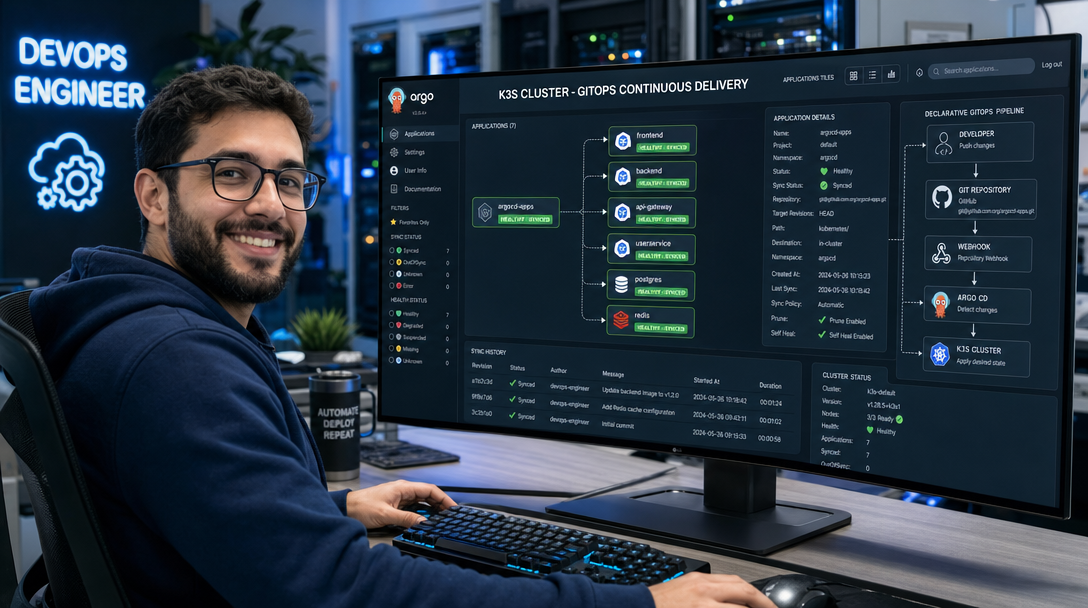
Argo CD operates as an active feedback controller inside the K3s control plane. Unlike external CI systems (like Jenkins or GitHub Actions runners) that require inbound administrative cluster access to push changes, Argo CD uses a pull-based architecture. It polls your Git repository over outbound HTTPS/SSH and reconciles the state locally.
+-------------------------------------------------------------------------------+
|                            DEVELOPER WORKFLOW                                 |
|  [Developer] --- git commit & push ---> [Git Repository (GitHub/GitLab)]      |
|                                                     |                         |
+-----------------------------------------------------+-------------------------+
                                                      |
                                      Outbound Polling / Webhook (HTTPS/SSH)
                                                      |
+-----------------------------------------------------v-------------------------+
| K3S KUBERNETES CLUSTER                                                        |
|                                                                               |
|   +-----------------------------------------------------------------------+   |
|   | Namespace: argocd                                                     |   |
|   |                                                                       |   |
|   |   +--------------------+     +------------------------------------+   |   |
|   |   |  repo-server       |<--->|  application-controller            |   |   |
|   |   |  (Parses Manifests)|     |  (Reconciliation & Drift Loop)     |   |   |
|   |   +--------------------+     +-----------------+------------------+   |   |
|   |                                                |                      |   |
|   |   +--------------------+                       | Reconciles Live      |   |
|   |   |  server (UI / API) |                       | vs Desired State     |   |
|   |   +--------------------+                       |                      |   |
|   +------------------------------------------------|----------------------+   |
|                                                    v                          |
|   +-----------------------------------------------------------------------+   |
|   | Target Namespaces (e.g. apps, monitoring, production)                |   |
|   |   [Deployments] <---> [Services] <---> [ConfigMaps] <---> [Ingress]   |   |
|   +-----------------------------------------------------------------------+   |
+-------------------------------------------------------------------------------+
Prerequisites
- A running K3s cluster (single-node or multi-node, Kubernetes v1.28+).
kubectlconfigured with administrative access to the cluster.- A public or private Git repository (GitHub, GitLab, or Gitea).
- At least 1.5 GB of free RAM on the master control-plane node.
Step 1: Installing Argo CD on K3s with Resource Tuning
Argo CD provides an official declarative manifest. On resource-constrained edge hardware or homelab mini-PCs, running the standard manifest out of the box can consume excessive memory due to high default cache allocations. We will create the namespace, apply the official installation manifest, and inspect the core pods:
# Create dedicated namespace
kubectl create namespace argocd

# Apply official Argo CD stable manifest
kubectl apply -n argocd -f https://raw.githubusercontent.com/argoproj/argo-cd/stable/manifests/install.yaml
Monitor the rollout until all microservices reach the Running state:
kubectl get pods -n argocd -wFor low-RAM K3s nodes (e.g., nodes with < 4GB RAM), disable high-memory features like HA redis clustering unless strictly needed. You can patch the argocd-repo-server and argocd-application-controller with reasonable resource limits to prevent Out-Of-Memory (OOM) eviction of critical cluster workloads:
kubectl patch deployment argocd-repo-server -n argocd --type=json -p='[
  {"op": "replace", "path": "/spec/template/spec/containers/0/resources", "value": {
    "requests": {"cpu": "100m", "memory": "128Mi"},
    "limits": {"cpu": "500m", "memory": "512Mi"}
  }}
]'
Step 2: Retrieving Admin Password and Accessing the Web UI
Upon initial installation, Argo CD generates a strong, random password for the default admin user and stores it encrypted inside a Kubernetes Secret named argocd-initial-admin-secret. Extract and decode it:
# Extract the initial admin password
ARGOCD_PW=$(kubectl -n argocd get secret argocd-initial-admin-secret -o jsonpath="{.data.password}" | base64 -d)
echo "Initial Admin Password: ${ARGOCD_PW}"
By default, the argocd-server service runs as ClusterIP. For immediate local testing, you can use port-forwarding:
kubectl port-forward svc/argocd-server -n argocd 8080:443Navigate to https://localhost:8080 in your browser, accept the self-signed certificate, and log in with username admin and your decoded password.
Step 3: Exposing Argo CD via K3s Traefik Ingress with TLS Passthrough
Because K3s ships with Traefik as its default Ingress controller, you can expose Argo CD natively across your local network or via a dedicated hostname. Because Argo CD terminates its own gRPC and HTTPS traffic, configuring Traefik with an IngressRoute or standard Ingress resource with SSL passthrough ensures both the Web UI and the argocd CLI operate smoothly without certificate negotiation conflicts:
apiVersion: networking.k8s.io/v1
kind: Ingress
metadata:
  name: argocd-server-ingress
  namespace: argocd
  annotations:
    traefik.ingress.kubernetes.io/router.entrypoints: websecure
    traefik.ingress.kubernetes.io/router.tls: "true"
spec:
  rules:
  - host: argocd.homelab.local
    http:
      paths:
      - path: /
        pathType: Prefix
        backend:
          service:
            name: argocd-server
            port:
              number: 443
Step 4: Defining the Declarative GitOps Application CRD
In true GitOps fashion, we do not click around the web UI to create our applications. Instead, we define an Argo CD Application Custom Resource Definition (CRD). This declarative YAML file specifies the source Git repository, the target cluster, the destination namespace, and automated synchronization policies.
Create a demo Git repository containing standard Kubernetes manifests (or use an existing public repository like https://github.com/argoproj/argocd-example-apps.git with path guestbook). Save the following manifest as guestbook-app.yaml:
apiVersion: argoproj.io/v1alpha1
kind: Application
metadata:
  name: guestbook-production
  namespace: argocd
  finalizers:
    - resources-finalizer.argocd.argoproj.io
spec:
  project: default
  source:
    repoURL: https://github.com/argoproj/argocd-example-apps.git
    targetRevision: HEAD
    path: guestbook
  destination:
    server: https://kubernetes.default.svc
    namespace: guestbook
  syncPolicy:
    automated:
      prune: true      # Automatically delete resources removed from Git
      selfHeal: true   # Automatically revert manual out-of-band cluster edits
      allowEmpty: false
    syncOptions:
      - CreateNamespace=true
      - PruneLast=true
    retry:
      limit: 5
      backoff:
        duration: 5s
        factor: 2
        maxDuration: 3m
Apply the Application CRD to your K3s cluster:
kubectl apply -f guestbook-app.yamlObserve the reconciliation in real time. Within seconds, Argo CD connects to the repository, analyzes the manifests, creates the guestbook namespace, deploys the Pods, Services, and ReplicaSets, and reports status Synced and Healthy.
Step 5: Testing Automated Self-Healing and Drift Detection
To verify the self-healing power of GitOps, let’s intentionally simulate configuration drift by manually tampering with the live deployment using kubectl:
# Manually scale down the replica count from 1 to 0
kubectl scale deployment guestbook-ui -n guestbook --replicas=0

# Check pod status immediately
kubectl get pods -n guestbook
Within seconds, Argo CD’s background controller detects the discrepancy between the live state (0 replicas) and the Git specification (1 replica). Because selfHeal: true is configured, Argo CD triggers an automatic sync and scales the deployment back up to 1 replica without any human intervention. The audit log in the Argo CD UI records the divergence and the self-healing remediation event.
Production Hardening Checklist for K3s GitOps
- Delete the Initial Admin Secret: After setting up SSO or updating the administrative password, delete the plaintext initial secret to eliminate credential exposure:
kubectl -n argocd delete secret argocd-initial-admin-secret - Implement Sealed Secrets or SOPS: Never store plaintext Kubernetes
Secretmanifests in your public or private Git repositories. Use tools like Bitnami Sealed Secrets or Mozilla SOPS with age encryption. The encrypted ciphertext can safely live in Git, while the in-cluster controller decrypts it dynamically. - Configure Git Webhooks: By default, Argo CD polls Git repositories every 3 minutes. For instantaneous deployments upon
git push, configure a GitHub or GitLab Webhook pointing tohttps://<your-argocd-domain>/api/webhook. - App of Apps Pattern: For complex homelabs or multi-environment clusters, avoid applying individual Application YAMLs manually. Implement the App of Apps pattern, where a root Argo CD Application tracks a repository directory containing child Application manifests.
Troubleshooting Common Argo CD on K3s Issues
1. Application Stuck in Infinite Sync Loop (Mutation Drift)
Symptom: Argo CD continuously attempts to synchronize resources, reporting status OutOfSync immediately after sync completes.
Root Cause: A mutating admission webhook (or Kubernetes default controller) injects default values into the live manifest (e.g., default container security context or port definitions) that are missing in your Git manifest.
Fix: Configure ignoreDifferences in your Application spec to instruct Argo CD to ignore fields dynamically generated by the cluster:
spec:
  ignoreDifferences:
  - group: apps
    kind: Deployment
    jsonPointers:
    - /spec/template/spec/containers/0/resources
2. Repository Authentication Fails with Private Repositories
Symptom: Argo CD reports rpc error: code = Unknown desc = error testing repository connectivity: authentication required.
Root Cause: The deploy key or Personal Access Token (PAT) is missing, improperly formatted, or lacks read permissions on the Git provider.
Fix: Register credentials declaratively in an argocd-secret or through the CLI using SSH deploy keys with ssh-ed25519 format:
argocd repo add git@github.com:youruser/homelab-infra.git --ssh-private-key-path ~/.ssh/id_ed255193. OOMKilled Pods on Resource-Constrained Worker Nodes
Symptom: argocd-repo-server or argocd-application-controller repeatedly crashes with exit code 137 (OOMKilled).
Root Cause: Repositories containing large Helm charts, recursive submodules, or monorepos exhaust the container’s available memory during manifest generation.
Fix: Increase the container memory limit or configure the ARGOCD_EXEC_TIMEOUT environment variable in argocd-cmd-params-cm to prevent execution stalls.
Conclusion
Adopting GitOps with Argo CD transforms how you manage applications on K3s. By shifting from imperative command-line operations to a purely declarative, Git-driven lifecycle, you gain automated self-healing, auditable deployments, and effortless rollbacks. Whether you are running a single-node edge server or a distributed homelab cluster, Argo CD provides the operational rigor and peace of mind needed for true production-grade Kubernetes management.

Hi, I’m Mark, the author of Clever IT Solutions: Mastering Technology for Success. I am passionate about empowering individuals to navigate the ever-changing world of information technology. With years of experience in the industry, I have honed my skills and knowledge to share with you. At Clever IT Solutions, we are dedicated to teaching you how to tackle any IT challenge, helping you stay ahead in today’s digital world. From troubleshooting common issues to mastering complex technologies, I am here to guide you every step of the way. Join me on this journey as we unlock the secrets to IT success.