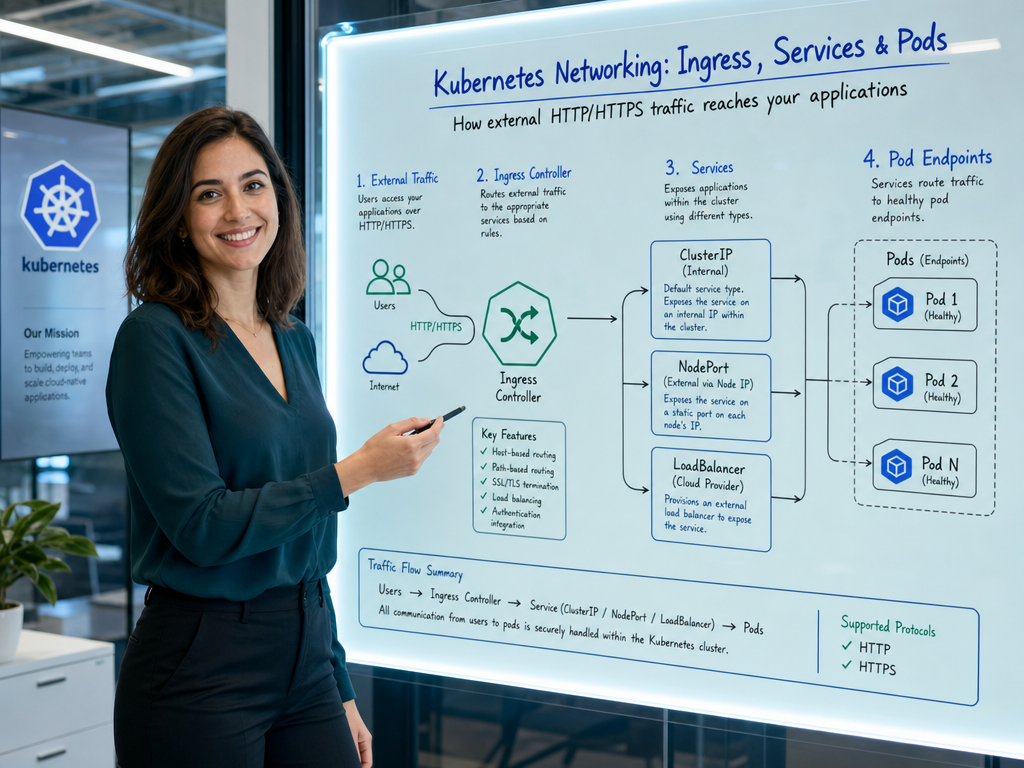
In Kubernetes, Pods are ephemeral by design. They are created, scaled, rescheduled, and destroyed dynamically, and with every recreation, a Pod receives a brand-new internal IP address. If client applications or microservices tried to connect directly to individual Pod IPs, the network topology would break within minutes.
To solve this problem, Kubernetes introduces two foundational networking abstractions: Services for internal load balancing and stable addressing (Layer 4), and Ingress for routing external HTTP/HTTPS traffic into the cluster (Layer 7). In this guide, we’ll demystify both concepts and provide practical, production-ready configurations.
Why Kubernetes Services Are Necessary
A Kubernetes Service is an abstraction that defines a logical set of Pods and a policy to access them. It gives your application:
- A Stable Virtual IP (ClusterIP): An IP address that does not change throughout the Service’s lifecycle.
- DNS-Based Service Discovery: Built-in cluster DNS (CoreDNS) allows services to communicate by name (e.g.,
http://payment-service.default.svc.cluster.local). - Automatic Load Balancing: Traffic sent to the Service is automatically distributed across all matching healthy Pods using
kube-proxyandEndpointSlices.
The Four Kubernetes Service Types
Kubernetes provides four distinct Service types to fit different networking architectures:
1. ClusterIP (Default)
Exposes the Service on an internal cluster IP address. Choosing this value makes the Service reachable only from within the cluster. This is the standard choice for internal microservices, databases, and message brokers.
apiVersion: v1
kind: Service
metadata:
  name: backend-service
  namespace: default
spec:
  type: ClusterIP
  selector:
    app.kubernetes.io/name: backend
  ports:
  - name: http
    port: 8080        # Port exposed by the Service
    targetPort: 8080  # Port the container listens on
2. NodePort
Exposes the Service on each Node’s IP at a static port (by default in the range 30000-32767). A NodePort Service automatically creates a ClusterIP behind the scenes and forwards traffic from <NodeIP>:<NodePort> to your Pods.
apiVersion: v1
kind: Service
metadata:
  name: frontend-nodeport
spec:
  type: NodePort
  selector:
    app.kubernetes.io/name: frontend
  ports:
  - port: 80
    targetPort: 80
    nodePort: 30080  # Optional; auto-allocated if omitted
3. LoadBalancer
Designed for public cloud environments (AWS, GCP, Azure, DigitalOcean). When deployed on a managed Kubernetes cluster, the cloud controller provisions an external Layer 4 cloud load balancer (such as an AWS NLB or GCP Cloud Load Balancing) that routes external traffic directly into your cluster.
apiVersion: v1
kind: Service
metadata:
  name: public-service
spec:
  type: LoadBalancer
  selector:
    app.kubernetes.io/name: frontend
  ports:
  - port: 443
    targetPort: 8443
4. ExternalName
Maps a Kubernetes Service to an external DNS name (e.g., an external RDS database) without proxying or using selectors. CoreDNS simply returns a CNAME record pointing to the external hostname.
apiVersion: v1
kind: Service
metadata:
  name: external-database
spec:
  type: ExternalName
  externalName: db.production.example.com
Entering Layer 7: What is Ingress?
While a LoadBalancer Service works well, provisioning a separate cloud load balancer for every individual microservice quickly becomes expensive and difficult to maintain. This is where Ingress comes in.
Ingress operates at Layer 7 (HTTP/HTTPS). It provides a single entry point into your cluster and routes incoming web requests based on hostnames, URL paths, and headers. It also handles SSL/TLS termination and path rewrites.
Ingress Resource vs. Ingress Controller
A common point of confusion is the distinction between these two components:
- Ingress Resource: A Kubernetes API manifest (YAML) that defines routing rules, hosts, paths, and backend services.
- Ingress Controller: An active software daemon (such as Ingress-NGINX, Traefik, HAProxy, or Envoy) running in the cluster that watches Ingress resources and reconfigures its routing engine accordingly.
Note: Creating an Ingress resource without an active Ingress Controller running in your cluster will have no effect.
Production Ingress Configuration with TLS
Below is a production-grade Ingress manifest showcasing virtual host routing, path-based routing, and automated TLS certificate management using cert-manager:
apiVersion: networking.k8s.io/v1
kind: Ingress
metadata:
  name: main-ingress
  namespace: default
  annotations:
    kubernetes.io/ingress.class: "nginx"
    cert-manager.io/cluster-issuer: "letsencrypt-prod"
    nginx.ingress.kubernetes.io/ssl-redirect: "true"
spec:
  tls:
  - hosts:
    - api.example.com
    - app.example.com
    secretName: example-tls-cert
  rules:
  # Host 1: API Routing
  - host: api.example.com
    http:
      paths:
      - path: /v1
        pathType: Prefix
        backend:
          service:
            name: api-v1-service
            port:
              number: 8080
      - path: /v2
        pathType: Prefix
        backend:
          service:
            name: api-v2-service
            port:
              number: 8080

  # Host 2: Web App Frontend
  - host: app.example.com
    http:
      paths:
      - path: /
        pathType: Prefix
        backend:
          service:
            name: frontend-service
            port:
              number: 80
Path Types Explained: Prefix vs. Exact
Under spec.rules[].http.paths[].pathType, Kubernetes supports three matching modes:
Prefix: Matches URL prefixes separated by/. For example,/apimatches/apiand/api/users, but not/apikeys.Exact: Matches the exact URL path with case sensitivity.ImplementationSpecific: Matches according to the Ingress Controller’s custom logic.
How to Troubleshoot Services and Ingress
When traffic doesn’t reach your application, follow this systematic debugging checklist:
1. Check if Endpoints Exist
If a Service has no endpoints, traffic cannot reach any Pod. This usually means your spec.selector labels do not match the labels in your Pod template:
kubectl get endpoints backend-service
kubectl get endpointslices -l kubernetes.io/service-name=backend-service
2. Test In-Cluster DNS and Connectivity
Spin up an ephemeral debugging pod to test internal DNS resolution and HTTP endpoints:
kubectl run debug --rm -it --image=curlimages/curl -- sh
# Inside the debug pod:
curl http://backend-service:8080/healthz
3. Verify Ingress Controller Address and Logs
# Check if Ingress received an external IP/Hostname
kubectl get ingress main-ingress

# Inspect Ingress details and events
kubectl describe ingress main-ingress

# View Ingress controller logs for routing errors
kubectl logs -n ingress-nginx -l app.kubernetes.io/name=ingress-nginx
Summary and Best Practices
- Use ClusterIP for internal services: Never expose internal databases or APIs directly via NodePort or LoadBalancer.
- Standardize on Ingress for Web Workloads: Route all public HTTP/HTTPS traffic through an Ingress controller to save cloud costs and unify TLS management.
- Align Labels Carefully: The most common Kubernetes networking bug is a mismatch between
spec.selectorin the Service andmetadata.labelsin the Pod template. - Automate TLS: Pair Ingress with
cert-managerto obtain and renew Let’s Encrypt certificates automatically.
By mastering Services for Layer 4 traffic and Ingress for Layer 7 routing, you can design resilient, secure, and cost-effective network architectures for any containerized application.

Hi, I’m Mark, the author of Clever IT Solutions: Mastering Technology for Success. I am passionate about empowering individuals to navigate the ever-changing world of information technology. With years of experience in the industry, I have honed my skills and knowledge to share with you. At Clever IT Solutions, we are dedicated to teaching you how to tackle any IT challenge, helping you stay ahead in today’s digital world. From troubleshooting common issues to mastering complex technologies, I am here to guide you every step of the way. Join me on this journey as we unlock the secrets to IT success.