Exposing web applications, self-hosted dashboards, and API microservices to the public internet inevitably attracts an endless barrage of automated reconnaissance scanners, credential stuffers, and exploit payloads. While traditional perimeter firewalls and basic rate limiters offer minimal resistance against distributed botnets, legacy host-level intrusion prevention systems like Fail2ban often struggle in modern containerized environments where traffic originates from isolated container bridges and dynamic virtual interfaces.
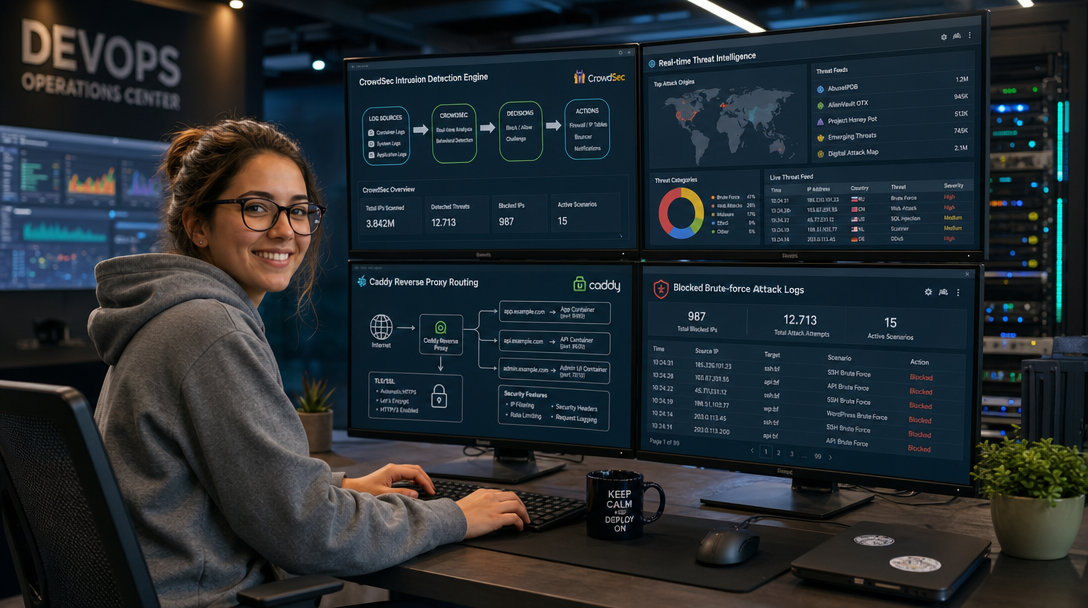
CrowdSec solves this challenge by decoupling intrusion detection from enforcement. Operating as an open-source, collaborative security engine, CrowdSec analyzes incoming logs across all your containers, detects malicious patterns using behavioral heuristics, and shares consensus-verified attacker IPs across a global defense network. When combined with Caddy—the modern, memory-safe reverse proxy with automatic TLS orchestration—you gain an automated edge security perimeter that drops malicious requests before they consume backend application cycles.
In this technical guide, you will learn how to design, deploy, and harden a production-grade intrusion prevention stack combining CrowdSec and Caddy in Docker Compose. We will configure real-time log acquisition, register an API remediation bouncer inside Caddy, test active defense scenarios against brute-force attacks, and subscribe to collaborative threat intelligence feeds.
Architectural Overview: Collaborative Edge Defense
The core strength of the CrowdSec and Caddy architecture lies in its modular division of responsibilities: the Remediation Component (Bouncer) runs inside or alongside the ingress reverse proxy, while the Security Engine (LAPI) operates independently to parse application and web server logs.
+-----------------------------------------------------------------------------------+
|                              PUBLIC INTERNET                                      |
+-----------------------------------------------------------------------------------+
                                         |
                                         | [HTTPS Port 443 / HTTP Port 80]
                                         v
+-----------------------------------------------------------------------------------+
| DOCKER HOST                                                                       |
|                                                                                   |
|  +-----------------------------------------------------------------------------+  |
|  | CADDY REVERSE PROXY CONTAINER                                               |  |
|  |                                                                             |  |
|  |  +---------------------------+     Live Query       +--------------------+  |  |
|  |  | CrowdSec HTTP Bouncer App | -------------------> | CrowdSec LAPI      |  |  |
|  |  +---------------------------+   (Decision Cache)   | (Port 8080)        |  |  |
|  |               |                                     +--------------------+  |  |
|  |     [Permitted Traffic Only]                                  ^             |  |
|  +---------------|-----------------------------------------------|-------------+  |
|                  |                                               |                |
|                  v                                               | Log Streaming  |
|  +-----------------------------------------+                     |                |
|  | BACKEND APPLICATION CONTAINERS          |                     |                |
|  | (WordPress, Nextcloud, APIs, Gitea)     | --------------------+                |
|  +-----------------------------------------+                                      |
|                                                                                   |
|  +-----------------------------------------------------------------------------+  |
|  | CROWDSEC SECURITY ENGINE CONTAINER                                          |  |
|  |                                                                             |  |
|  |  - Ingests Caddy Access Logs & Docker Syslog Streams                        |  |
|  |  - Evaluates Attack Scenarios (HTTP Path Traversal, Brute-Force, Scanners)   |  |
|  |  - Generates Local Remediation Decisions (Drop / Ban / Captcha)             |  |
|  |  - Pulls Community Threat Intelligence Blocklists from CrowdSec Central Hub |  |
|  +-----------------------------------------------------------------------------+  |
+-----------------------------------------------------------------------------------+
When an HTTP client hits your domain, Caddy inspects the client’s real public IP address against an in-memory decision table synced continuously with CrowdSec’s Local API (LAPI). If the IP is blacklisted—either because it triggered a local heuristic scenario or because millions of other CrowdSec nodes reported it—Caddy rejects the connection with an HTTP 403 Forbidden immediately. Clean requests are forwarded to internal backend services without latency overhead.
Directory Structure and Prerequisites
Before launching the containers, ensure your Linux host (Ubuntu 22.04/24.04 or Debian 12) has Docker Engine (version 24.0+) and Docker Compose Plugin installed. Your host firewall (e.g., UFW or nftables) should allow incoming traffic on ports 80 and 443.
Create a dedicated workspace directory for the edge security stack:
sudo mkdir -p /opt/crowdsec-caddy/{crowdsec-config,crowdsec-data,caddy-config,caddy-data}
cd /opt/crowdsec-caddy
Set appropriate file permissions so the containerized daemons can write state and database files:
sudo chown -R 1000:1000 /opt/crowdsec-caddy/caddy-config /opt/crowdsec-caddy/caddy-data
sudo chmod 750 /opt/crowdsec-caddy
Step 1: Custom Caddy Image with CrowdSec Bouncer
Standard official Caddy images do not include the CrowdSec layer-7 bouncer module out of the box. We use Docker multi-stage builds and xcaddy to compile a customized, lean Caddy binary containing the official crowdsecurity/caddy-crowdsec-bouncer extension.
Create a Dockerfile in /opt/crowdsec-caddy/Dockerfile:
# Multi-stage build using xcaddy
FROM caddy:2.9-builder-alpine AS builder

RUN xcaddy build \
    --with github.com/crowdsecurity/caddy-crowdsec-bouncer

FROM caddy:2.9-alpine

COPY --from=builder /usr/bin/caddy /usr/bin/caddy
Step 2: Defining the Production Docker Compose Stack
We deploy two core infrastructure services: crowdsec (the security engine) and caddy (the ingress gateway with integrated remediation). We also include a lightweight sample backend container (whoami) to verify proxy behavior.
Create docker-compose.yml in /opt/crowdsec-caddy/docker-compose.yml:
services:
  crowdsec:
    image: crowdsecurity/crowdsec:v1.6.4
    container_name: crowdsec-engine
    restart: unless-stopped
    environment:
      - GID=1000
      - COLLECTIONS=crowdsecurity/caddy crowdsecurity/linux crowdsecurity/http-cve crowdsecurity/whitelist-good-actors
    volumes:
      - ./crowdsec-config:/etc/crowdsec
      - ./crowdsec-data:/var/lib/crowdsec/data
      - /var/log:/var/log:ro
      - /var/run/docker.sock:/var/run/docker.sock:ro
      - caddy-logs:/var/log/caddy:ro
    networks:
      - security-net
    expose:
      - "8080"
    healthcheck:
      test: ["CMD", "cscli", "version"]
      interval: 30s
      timeout: 5s
      retries: 3

  caddy:
    build:
      context: .
      dockerfile: Dockerfile
    container_name: caddy-ingress
    restart: unless-stopped
    ports:
      - "80:80"
      - "443:443"
      - "443:443/udp" # HTTP/3 QUIC
    environment:
      - CROWDSEC_LAPI_KEY=my_secure_caddy_bouncer_api_key_4439
      - CROWDSEC_LAPI_URL=http://crowdsec-engine:8080/
    volumes:
      - ./Caddyfile:/etc/caddy/Caddyfile:ro
      - ./caddy-config:/config
      - ./caddy-data:/data
      - caddy-logs:/var/log/caddy
    networks:
      - security-net
      - app-net
    depends_on:
      crowdsec:
        condition: service_healthy

  backend-app:
    image: traefik/whoami:v1.10.4
    container_name: demo-backend-app
    restart: unless-stopped
    networks:
      - app-net
    expose:
      - "80"

networks:
  security-net:
    driver: bridge
    internal: true
  app-net:
    driver: bridge

volumes:
  caddy-logs:
Notice the deliberate network segmentation: security-net is an internal bridge with no exposed host ports, ensuring communication between Caddy and the CrowdSec LAPI daemon remains strictly isolated from external probe attempts.
Step 3: Configuring CrowdSec Log Acquisition
For CrowdSec to detect threats, it must parse real-time access logs generated by Caddy. We define an acquisition stream that monitors Caddy’s structured JSON log file.
Create the directory and the acquisition configuration file in /opt/crowdsec-caddy/crowdsec-config/acquis.yaml:
# CrowdSec Acquisition Configuration
filenames:
  - /var/log/caddy/access.log
labels:
  type: caddy
---
source: docker
container_name:
  - caddy-ingress
labels:
  type: caddy
Step 4: Crafting the Caddyfile with Remediation Middleware
Next, we configure Caddy to format its access logs in JSON and pass incoming requests through the CrowdSec bouncer handler before proxying traffic to the backend application.
Create /opt/crowdsec-caddy/Caddyfile:
{
    # Global options
    admin off
    email admin@example.com

    crowdsec {
        api_url {$CROWDSEC_LAPI_URL}
        api_key {$CROWDSEC_LAPI_KEY}
        ticker_interval 15s
        appsec_url ""
    }
}

app.example.com {
    # Logging configuration for CrowdSec ingestion
    log {
        output file /var/log/caddy/access.log {
            roll_size 20mb
            roll_keep 5
            roll_keep_for 720h
        }
        format json
    }

    # Route incoming requests through CrowdSec bouncer
    route {
        crowdsec
        reverse_proxy backend-app:80 {
            header_up X-Forwarded-Port {server_port}
            header_up X-Real-IP {remote_host}
        }
    }
}
Step 5: Registering the Bouncer and Initial Launch
Start the CrowdSec engine first to allow its internal SQLite database and configuration files to initialize:
docker compose up -d crowdsecWait approximately 15 seconds until the healthcheck passes, then register Caddy’s API key with the CrowdSec Local API:
docker exec -t crowdsec-engine cscli bouncers add caddy-bouncer --key my_secure_caddy_bouncer_api_key_4439Verify that the bouncer was successfully registered:
docker exec -t crowdsec-engine cscli bouncers listYou should see output similar to:
+---------------+-----------------+----------------------------------+-----------------------+--------+---------+
|     NAME      |   IP ADDRESS    |            VALID API KEY         |      LAST API PULL    | TYPE   | VERSION |
+---------------+-----------------+----------------------------------+-----------------------+--------+---------+
| caddy-bouncer | 172.18.0.3      | ✔                                | 2026-10-02T16:40:12Z  | caddy  | v1.0.0  |
+---------------+-----------------+----------------------------------+-----------------------+--------+---------+
Now build and launch the complete stack:
docker compose up -d --buildStep 6: Enrolling in the CrowdSec Collaborative Community Hub
CrowdSec’s signature capability is collaborative threat sharing. When thousands of security administrators run CrowdSec, instances that observe port scans, SSH dictionary attacks, or WordPress CVE probes report those signals to the central hub. Validated signals are compiled into global blocklists distributed back to your node.
To enroll your host in the free CrowdSec Console for visualization and automated blocklist subscriptions:
# 1. Sign up at https://app.crowdsec.net and retrieve your enrollment key
# 2. Run the enrollment command inside your engine container:
docker exec -it crowdsec-engine cscli console enroll <YOUR_ENROLLMENT_TOKEN>

# 3. Restart the container to sync active blocklists
docker compose restart crowdsec
Verify that hub collections are active and up to date:
docker exec -t crowdsec-engine cscli collections listStep 7: Validating Threat Detection and Active Remediation
To verify that our defense perimeter is actively functioning, we can simulate an automated directory enumeration and sensitive file probe from an external client (or secondary terminal).
Execute rapid requests targeting sensitive files (e.g., WordPress configuration files and sensitive environment dumps):
# Run from an external test workstation
for i in {1..15}; do
  curl -s -o /dev/null -w "%{http_code}\n" https://app.example.com/.env
done
Inspect the alerts recorded by the CrowdSec engine:
docker exec -t crowdsec-engine cscli alerts listReview the active decision list:
docker exec -t crowdsec-engine cscli decisions listImmediately following the trigger threshold, any subsequent connection attempt from that client IP address will receive an instant 403 Forbidden from Caddy without touching the backend application.
If you need to unban an IP during testing, use:
docker exec -t crowdsec-engine cscli decisions delete --ip <TEST_CLIENT_IP>Production Hardening and Operational Best Practices
- Preserve Real Client IP: If your Docker host sits behind Cloudflare, AWS ALB, or an upstream load balancer, Caddy must be configured with
trusted_proxies. Failing to set trusted proxies causes Caddy to pass the upstream proxy’s IP to CrowdSec, risking an accidental ban of entire CDN proxy ranges. - Persistent Decision Cache: The Caddy CrowdSec bouncer maintains an internal in-memory cache of decisions with a short TTL (defined by
ticker_interval). This prevents per-request query latency on the LAPI database. - Automated Hub Updates: Add a simple cron job or systemd timer on your host to periodically update CrowdSec hub collections and threat scenarios:
docker exec crowdsec-engine cscli hub update && docker exec crowdsec-engine cscli hub upgrade. - Exclude Internal Healthchecks: Ensure container orchestration probes (such as Docker Compose healthchecks or Prometheus scrapers) connect via local loopback or carry whitelisted User-Agents to prevent false-positive alert generation.
Troubleshooting Common Failure Modes
1. Caddy Fails to Start with “LAPI connection refused”
Cause: Caddy initializes before the CrowdSec Local API service has fully bound to port 8080 inside the Docker bridge network.
Fix: Ensure the crowdsec service in docker-compose.yml includes an explicit healthcheck, and configure Caddy’s service definition with depends_on: crowdsec: condition: service_healthy.
2. False Positive Bans on Upstream CDN Proxy IPs
Cause: CrowdSec identifies attacks coming from Cloudflare or corporate egress proxies rather than the end-user IP.
Fix: In your Caddyfile, configure the global servers block to trust upstream CIDR ranges: servers { trusted_proxies cloudflare }, and install the crowdsecurity/whitelist-good-actors collection inside the CrowdSec engine.
3. Uncontrolled Growth of Access Logs
Cause: High-traffic environments can cause /var/log/caddy/access.log to consume disk space rapidly if log rotation is omitted.
Fix: Use Caddy’s built-in file log rolling directives (roll_size 20mb, roll_keep 5, roll_keep_for 720h) as demonstrated in our Caddyfile, ensuring deterministic storage utilization.
Conclusion and Next Steps
By pairing Caddy with CrowdSec, you establish a resilient, self-updating security boundary for all containerized workloads. Unlike static firewall rules, this dynamic perimeter actively adapts to emerging zero-day vulnerabilities, defends against distributed brute-force campaigns, and leverages the collective defensive intelligence of thousands of administrators worldwide.
For further optimization, consider exploring CrowdSec AppSec (WAF module) to perform deep inspection of HTTP request bodies, or integrating CrowdSec alerts into your centralized monitoring stack using Prometheus and Grafana alert managers.

Hi, I’m Mark, the author of Clever IT Solutions: Mastering Technology for Success. I am passionate about empowering individuals to navigate the ever-changing world of information technology. With years of experience in the industry, I have honed my skills and knowledge to share with you. At Clever IT Solutions, we are dedicated to teaching you how to tackle any IT challenge, helping you stay ahead in today’s digital world. From troubleshooting common issues to mastering complex technologies, I am here to guide you every step of the way. Join me on this journey as we unlock the secrets to IT success.