In modern digital operations, staying ahead of external changes is critical. Whether you are a security engineer monitoring critical vendor portals for unauthorized changes, a DevOps specialist tracking API contract changes across partner systems, an IT asset manager watching for hardware stock replenishments, or a compliance officer tracking regulatory updates, manual web page inspection is impossible to sustain. Traditional uptime monitors like Uptime Kuma or Pingdom can tell you if an HTTP endpoint returns a 200 OK status code, but they cannot tell you whether a critical paragraph of text changed, an API response payload altered its JSON structure, or a website underwent unauthorized visual defacement.
Commercial website monitoring services solve this problem at high subscription costs, severe rate limits, and intrusive data retention policies. Furthermore, proprietary SaaS monitors require routing your internal search queries and watch targets through third-party servers, posing serious privacy and operational security risks when monitoring private intranet resources or confidential business targets.
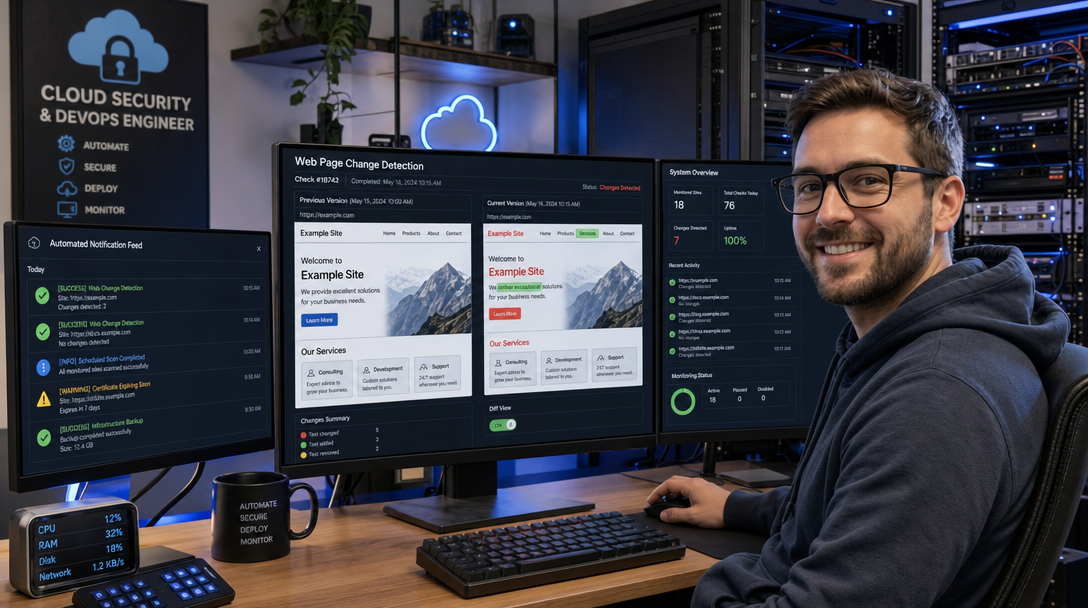
ChangeDetection.io is the definitive open-source solution for automated web page, PDF, and API change monitoring. Featuring native visual side-by-side diffing, CSS and XPath filtering, JSON/XML restructuring diffs, and integration with the versatile Apprise notification engine, ChangeDetection.io transforms passive web watching into an automated, real-time intelligence pipeline. When paired with a headless Playwright browser runner, it effortlessly renders modern single-page JavaScript applications (SPAs), executes automated click interactions, and bypasses rudimentary bot verifications.
In this comprehensive guide, you will learn how to self-host ChangeDetection.io with Playwright in Docker Compose, configure high-precision CSS and JSON filters, route alerts across Discord, Telegram, and Webhooks, and harden the entire deployment for production reliability.
Architecture: How ChangeDetection.io and Playwright Interact
ChangeDetection.io operates as a modular, decoupled system. While basic static HTML pages can be scraped using lightweight Python HTTP requests, modern dynamic web applications rely heavily on client-side JavaScript rendering (React, Vue, Angular). To capture dynamic DOM states, ChangeDetection.io offloads heavy rendering tasks to a dedicated headless browser sidecar container running Chromium via Playwright.
The following architectural diagram illustrates the flow of requests, content parsing, visual diffing, and alert dispatching:
+-----------------------------------------------------------------------+
|                    Client Browser / Admin Console                     |
|                       (Web Interface: Port 5000)                      |
+-----------------------------------+-----------------------------------+
                                    |
                            (HTTPS / Port 443)
                                    v
+-----------------------------------------------------------------------+
|                      Reverse Proxy (Caddy / Nginx)                    |
|                - Automated TLS Termination & Basic Auth               |
+-----------------------------------+-----------------------------------+
                                    |
                            (Internal Network)
                                    v
+-----------------------------------------------------------------------+
|                 ChangeDetection.io Primary Container                  |
|  +-----------------------------------------------------------------+  |
|  |                   Scheduler & Comparison Engine                 |  |
|  |   - Watch List Configuration (URLs, Cron Schedules)             |  |
|  |   - Extraction Filters (CSS Selectors, XPath, JSONPath)         |  |
|  |   - Snapshot Datastore (Disk / Volume Mount)                    |  |
|  |   - Text Diffing & Visual Side-by-Side Comparison Generator     |  |
|  +----------------+-------------------------------+----------------+  |
|                   |                               |                   |
| (Dynamic Render)  |                               | (Alerts Triggered)|
| WebSocket / CDP   |                               | Apprise Engine    |
|                   v                               v                   |
|  +--------------------------------+   +----------------------------+  |
|  |  Playwright-Chrome Container   |   |   Notification Dispatcher  |  |
|  |   - Headless Chromium Browser  |   |   - Discord Webhook        |  |
|  |   - Full DOM Evaluation        |   |   - Telegram Bot API       |  |
|  |   - Screenshot & PDF Capture   |   |   - Custom HTTP Webhooks   |  |
|  +----------------+---------------+   +----------------------------+  |
+-------------------|---------------------------------------------------+
                    |
                    v (Outbound HTTPS Requests)
         [ Target Public Webpages & REST APIs ]
Key highlights of this decoupled architecture include:
- Resource Isolation: Headless Chromium browsers consume substantial CPU and memory during complex DOM rendering. Isolating Playwright in a separate container guarantees that browser crashes or memory leaks never interrupt the primary scheduler or corrupt watch history.
- Multi-Format Intelligence: ChangeDetection.io does not merely scan raw HTML text. It parses PDF documents via OCR/pdfplumber, extracts structured JSON fields using JSONPath, monitors XML/RSS feeds, and captures full-page visual PNG screenshots for visual image diffing.
- Intelligent Notification Routing: By leveraging Apprise, you can route specific watches to different channels—for example, sending security portal defacement alerts to an emergency PagerDuty or Slack channel while sending consumer stock notifications to a Telegram chat.
Prerequisites and Directory Setup
Before launching the stack, ensure your host environment fulfills the following prerequisites:
- A Linux host (Ubuntu 24.04/22.04 LTS or Debian 12 recommended) with at least 2 CPU cores and 4 GB of RAM (headless Chromium requires sufficient memory headroom).
- Docker Engine v24.0+ and Docker Compose v2.20+ installed.
- A dedicated directory for persistent application storage and snapshots.
Create the project directory structure on your host machine:
sudo mkdir -p /opt/changedetection/datastore
sudo chown -R 1000:1000 /opt/changedetection
chmod -R 750 /opt/changedetection
cd /opt/changedetection
Setting ownership to user ID 1000 ensures that the non-root application process inside the container can reliably write historical snapshots, screenshots, and SQLite databases without filesystem permission errors.
Complete Production Docker Compose Specification
Create the compose.yaml file inside /opt/changedetection:
nano compose.yamlPaste the following complete production deployment configuration:
services:
  changedetection:
    image: ghcr.io/dgtlmoon/changedetection.io:latest
    container_name: changedetection
    restart: unless-stopped
    ports:
      # Bind to localhost; access externally via reverse proxy
      - "127.0.0.1:5000:5000"
    volumes:
      - /opt/changedetection/datastore:/datastore
    environment:
      # Point to the headless Chromium sidecar container
      - PLAYWRIGHT_DRIVER_URL=ws://playwright-chrome:3000
      # Base URL used in notification links
      - BASE_URL=https://changedetection.yourdomain.com
      # Number of concurrent worker threads
      - WEBDRIVER_WORKERS=3
      # Timezone configuration
      - TZ=UTC
    depends_on:
      playwright-chrome:
        condition: service_started
    deploy:
      resources:
        limits:
          cpus: '2.0'
          memory: 2048M
        reservations:
          memory: 512M
    security_opt:
      - no-new-privileges:true
    networks:
      - change-net

  playwright-chrome:
    image: dgtlmoon/sockpuppetbrowser:latest
    container_name: playwright-chrome
    restart: unless-stopped
    environment:
      - SCREEN_WIDTH=1920
      - SCREEN_HEIGHT=1080
      - SCREEN_DEPTH=24
      - MAX_CONCURRENT_CHROME_PROCESSES=3
      # Auto-restart browser sessions to clear memory
      - CHROME_REFRESH_SECONDS=1800
    ipc: host
    deploy:
      resources:
        limits:
          cpus: '2.0'
          memory: 2048M
        reservations:
          memory: 1024M
    security_opt:
      - seccomp:unconfined
    networks:
      - change-net

networks:
  change-net:
    driver: bridge
Key configuration attributes to note:
PLAYWRIGHT_DRIVER_URL: Configures ChangeDetection.io to communicate directly with thesockpuppetbrowsersidecar over a WebSocket connection. Sockpuppetbrowser is an optimized Chromium container bundled with anti-detection capabilities and font packs.ipc: host: Crucial for Chromium performance. Docker’s default/dev/shmshared memory partition is often restricted to 64 MB, which causes headless Chrome to crash on resource-intensive pages. Using host IPC eliminates shared memory constraints.MAX_CONCURRENT_CHROME_PROCESSES: Caps simultaneous browser instances to prevent CPU starvation during large check batches.
Launch the containers in detached mode:
docker compose up -dVerify that both services are healthy and active:
docker compose ps
docker compose logs -f changedetection
Configuring Precision Content Filters
Once you access the web interface at http://127.0.0.1:5000 (or via your configured domain), you can add your first watch. While monitoring an entire HTML document is trivial, websites frequently change dynamic timestamps, CSRF tokens, view counts, and advertisements. Without filtering, these irrelevant micro-changes trigger false-positive alert storms.
1. CSS and XPath Target Selectors
To restrict monitoring to the exact content area you care about, open your watch settings and navigate to the Filters & Sub-match tab:
- CSS Selector Filtering: Enter
#content-areaorarticle.main-postto monitor only the article body, ignoring navigation headers, sidebars, and footers. - CSS Exclusion Filtering: Use the Ignore elements field to strip out dynamic widgets:
header, footer, .ad-banner, .comment-count, #timestamp. - XPath Support: For XML feeds or complex DOM hierarchies, specify exact XPath queries, such as
//div[@class='product-pricing']/span[contains(@class, 'current-price')].
2. REST API & JSONPath Monitoring
ChangeDetection.io natively inspects REST API endpoints returning JSON payloads. If you want to track a specific API response—such as a service release version or inventory level—configure the watch URL to https://api.github.com/repos/louislam/dockge/releases/latest and apply a JSONPath filter:
json:$.tag_nameChangeDetection.io will extract only the tag_name attribute, ignoring build IDs, release notes download counters, and timestamps.
3. Visual Screenshot Diffing (Pixel-by-Pixel)
For portals where layout, design integrity, or visual charts matter more than raw text, enable the Visual Filter. When Playwright renders the page, ChangeDetection.io takes a full-page screenshot. In the Visual Diff tab, you can inspect color-coded side-by-side comparisons where additions appear in green, deletions in red, and layout shifts highlighted with visual outlines.
Multi-Channel Alert Configuration (Apprise)
ChangeDetection.io integrates the powerful Apprise library, enabling out-of-the-box notifications to over 80 chat, email, and ticketing protocols without writing custom scripts.
To configure notifications globally across all watches, navigate to Settings > Notifications:
Discord Webhooks
To send rich alert cards to a dedicated Discord monitoring channel, paste your webhook URL in Apprise format:
discord://webhook_id/webhook_tokenTelegram Bot Alerts
For instant mobile alerts via Telegram, create a bot via @BotFather and configure your chat ID:
tgram://bot_token/chat_idCustomizing Alert Notification Templates
Customize the Notification Body to include essential diagnostic metadata and immediate diff previews:
🔔 Change Detected on Watch: {watch_title}
🌐 Target URL: {watch_url}
🔍 Change URL: {diff_url}

Summary of Differences:
{diff}
Click Send test notification to confirm that your endpoint receives the payload with proper formatting and clickable diff links.
Production Hardening and Reverse Proxy Setup
Because ChangeDetection.io executes arbitrary outbound web requests and displays scraped HTML content, security hardening is essential to protect your server from Server-Side Request Forgery (SSRF) and unauthorized access.
1. Enable Built-In Password Protection
By default, ChangeDetection.io does not enforce authentication. Immediately navigate to Settings > General, scroll down to Password Protection, enter a strong password, and click Save. All future sessions will require authentication before viewing or adding watches.
2. Terminate TLS with Caddy Reverse Proxy
Route external traffic through a hardened Caddy reverse proxy to enforce automatic HTTPS and security headers:
changedetection.yourdomain.com {
    reverse_proxy 127.0.0.1:5000 {
        header_up Host {host}
        header_up X-Real-IP {remote_host}
        header_up X-Forwarded-For {remote_host}
        header_up X-Forwarded-Proto {scheme}
    }

    # Strict Content Security Policy and Transport Security
    header {
        Strict-Transport-Security "max-age=31536000; includeSubDomains; preload"
        X-Content-Type-Options "nosniff"
        X-Frame-Options "SAMEORIGIN"
        Referrer-Policy "strict-origin-when-cross-origin"
    }
}
Troubleshooting Common ChangeDetection.io Issues
When monitoring external targets across the public internet, anti-bot defenses and network latency can introduce unexpected errors. Here are three common issues and their tested resolutions:
1. Target Returns HTTP 403 Forbidden or Cloudflare Challenge
Symptom: The watch status turns red with an error: 403 Forbidden or Just a moment... Enable JavaScript and cookies to continue.
Root Cause: The target website detects the default Python requests user-agent or blocks standard datacenter IP ranges.
Fix: In the watch configuration, navigate to the Request tab. Switch Fetch Method from Basic fast re-fetch to Chrome / Javascript (Playwright). Furthermore, set a realistic desktop User-Agent string and add a 2–5 second Wait before extracting delay to allow dynamic security challenges to settle before scraping the DOM.
2. Playwright WebSocket Connection Timeout
Symptom: Watch logs display ConnectionRefusedError: [Errno 111] Connect call failed ('playwright-chrome', 3000) or timeout waiting for browser initialization.
Root Cause: The playwright-chrome container failed to start or ran out of shared memory during heavy initialization.
Fix: Check container logs with docker compose logs playwright-chrome. Verify that ipc: host is properly set in your compose.yaml. Test internal container reachability by executing a network test from the ChangeDetection container:
docker exec -it changedetection nc -zv playwright-chrome 30003. Excessive Disk Growth from Stored Visual Diffs
Symptom: The /opt/changedetection/datastore folder expands to tens of gigabytes within a few weeks.
Root Cause: Capturing uncompressed full-page PNG screenshots and historical HTML snapshots on high-frequency schedules (e.g., every 5 minutes) accumulates rapidly.
Fix: In Settings > General, configure Snapshot history limit to retain only the last 20 or 50 snapshots per watch. Additionally, disable Save full page screenshot on watches where only textual or numerical changes (like pricing or version tags) are required.
Conclusion and Next Steps
Deploying ChangeDetection.io alongside Playwright provides an unbeatable, private intelligence engine. By automating website defacement monitoring, API schema tracking, and critical alert dispatching, sysadmins and engineering teams gain proactive visibility into third-party ecosystem changes without paying recurring SaaS subscription fees.
To further extend your automated monitoring architecture, consider integrating ChangeDetection.io with:
- n8n Workflow Automation: Trigger automated incident response workflows or webhook actions in n8n whenever a critical web portal changes.
- Beszel or Vector: Ingest container resource metrics and scrape logs to monitor CPU spikes and memory consumption during intensive Chromium rendering batches.
- Tailscale or Cloudflare Tunnels: Provide secure, zero-trust remote access to your ChangeDetection dashboard for your entire engineering team without opening firewall ports.

Hi, I’m Mark, the author of Clever IT Solutions: Mastering Technology for Success. I am passionate about empowering individuals to navigate the ever-changing world of information technology. With years of experience in the industry, I have honed my skills and knowledge to share with you. At Clever IT Solutions, we are dedicated to teaching you how to tackle any IT challenge, helping you stay ahead in today’s digital world. From troubleshooting common issues to mastering complex technologies, I am here to guide you every step of the way. Join me on this journey as we unlock the secrets to IT success.