Modern engineering teams rely heavily on clean, collaborative documentation. For years, organizations defaulted to proprietary cloud workspaces like Notion, Confluence, or Slite. However, as infrastructure documentation expands to include sensitive architectural topologies, incident post-mortems, and deployment playbooks, storing internal institutional knowledge in third-party multi-tenant SaaS clouds introduces significant data sovereignty, regulatory, and privacy risks. Conversely, legacy self-hosted wikis like MediaWiki or DokuWiki often suffer from antiquated user interfaces, lack realtime collaborative editing, and offer poor mobile experiences.
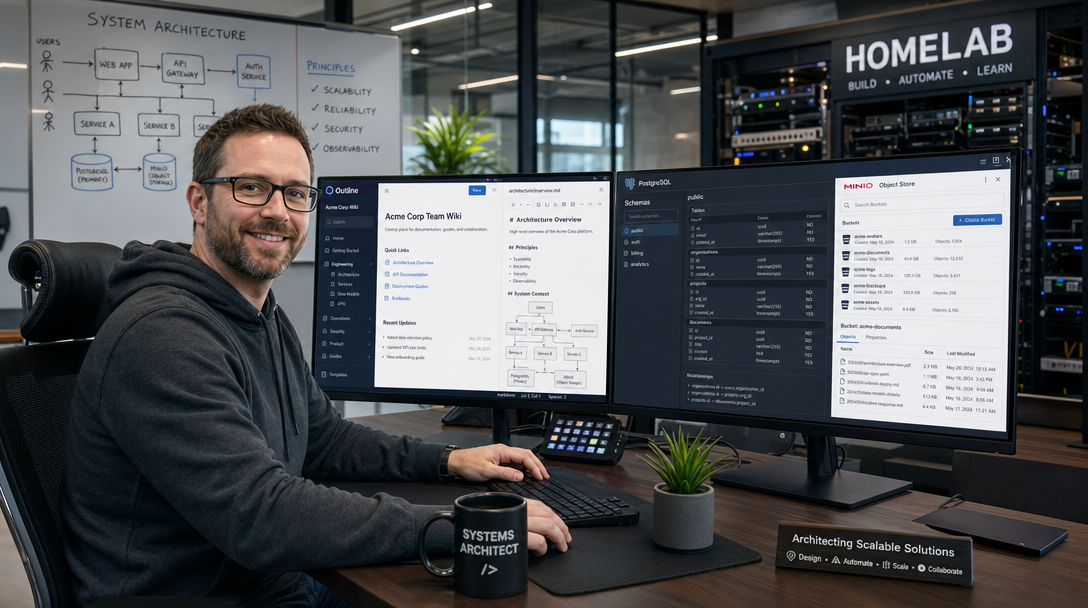
Outline bridges this gap as the premier modern, open-source team knowledge base. Built on React and Node.js, Outline delivers a beautiful Notion-like markdown editor, instantaneous full-text search, realtime multi-user editing, and enterprise document hierarchies. Unlike standalone applications, Outline operates as an interconnected microservices architecture requiring relational persistence, in-memory queues, S3-compatible object storage for file attachments, and OpenID Connect (OIDC) for identity federation. In this production-ready guide, you will deploy a fully self-hosted Outline instance using Docker Compose, PostgreSQL 16, Redis 7, MinIO S3 storage, and Caddy with automated Let’s Encrypt TLS.
Outline Architectural Blueprint & Component Hierarchy
Deploying Outline in a self-hosted topology requires understanding how its decoupled microservices communicate. Outline deliberately avoids bundling its own file store or basic username/password database; instead, it enforces enterprise architectural standards:
- Outline Web & API Server: Manages collaborative document editing via WebSockets, markdown parsing, REST endpoints, and permissions enforcement.
- PostgreSQL 16: Stores relational entities including workspaces, users, document revision trees, collections, and access control lists (ACLs).
- Redis 7 In-Memory Cache: Powers BullMQ background job queues for document indexing, email notifications, avatar processing, and WebSocket pub/sub synchronization.
- MinIO Object Storage: Provides private, S3-compatible bucket storage for document attachments, embedded diagrams, screenshots, and export archives.
- OIDC Identity Provider: Outline delegates authentication entirely to an OpenID Connect provider (such as Authentik, Keycloak, or Google Workspace), ensuring centralized access control and multi-factor authentication.
- Caddy Edge Proxy: Terminates TLS 1.3, handles automated ACME Let’s Encrypt certificate renewals, and proxies WebSocket connections.
+-----------------------------------------------------------------------+
|                         ENGINEERING CLIENTS                           |
|       Web Browsers (Markdown Editor / Realtime Collaboration)         |
+-----------------------------------------------------------------------+
                                    |
                    HTTPS (TLS 1.3) & WSS (WebSockets)
                                    v
+-----------------------------------------------------------------------+
|                    EDGE REVERSE PROXY (Caddy)                         |
|   - Automatic Let's Encrypt TLS                                       |
|   - WebSocket Passthrough & Security Headers                          |
+-----------------------------------+-----------------------------------+
                                    |
                    Internal Docker Bridge Network
                                    v
+-----------------------------------------------------------------------+
|                      OUTLINE APPLICATION SERVER                       |
|                       outlinewiki/outline:latest                      |
|       - Node.js / React Collaborative Markdown Engine                 |
|       - WebSocket Realtime Synchronization                            |
|       - REST Management Endpoints (Port 3000)                         |
+-------------------+---------------+-------------------+---------------+
                    |               |                   |
            Database|          Queue|           S3 / API|
                    v               v                   v
+-----------------------+ +-------------------+ +-----------------------+
|     POSTGRESQL 16     | |      REDIS 7      | |       MINIO S3        |
|  postgres:16-alpine   | |   redis:7-alpine  | |  minio/minio:latest   |
| - Relational Metadata | | - BullMQ Queues   | | - S3 Document Files   |
| - Document History    | | - WebSocket Sync  | | - Embedded Images     |
| - Host: ./pgdata      | | - Host: ./redis   | | - Host: ./minio_data  |
+-----------------------+ +-------------------+ +-----------------------+
Prerequisites & Host Preparation
Ensure your server meets the following operational specifications:
- A dedicated Linux host running Ubuntu 24.04 LTS, Debian 12, or Rocky Linux 9 with at least 2 CPU cores and 4 GB of RAM (8 GB recommended for active teams).
- Docker Engine 26+ and Docker Compose v2 installed.
- A public Fully Qualified Domain Name (FQDN) for Outline (e.g.
wiki.yourdomain.com) and an optional subdomain for MinIO S3 API traffic (e.g.s3.yourdomain.com). - An existing OpenID Connect (OIDC) identity provider. In this tutorial, we configure standard generic OIDC compatible with Authentik, Keycloak, or Okta.
Initialize the directory structure and establish appropriate permissions:
sudo mkdir -p /opt/outline/{pgdata,redis_data,minio_data,caddy_data,caddy_config}
cd /opt/outline
sudo chmod -R 750 /opt/outline
Cryptographic Secrets & Environment Configuration (.env)
Outline requires dedicated cryptographic secrets to sign session cookies and encrypt integration tokens. Generate high-entropy 32-byte hex keys using OpenSSL:
SECRET_KEY=$(openssl rand -hex 32)
UTILS_SECRET=$(openssl rand -hex 32)
PG_PASSWORD=$(openssl rand -hex 24)
MINIO_ROOT_PASSWORD=$(openssl rand -hex 24)

cat << EOF > /opt/outline/.env
# Domain & Network
URL=https://wiki.yourdomain.com
PORT=3000
NODE_ENV=production

# Cryptographic Keys (DO NOT LOSE THESE!)
SECRET_KEY=${SECRET_KEY}
UTILS_SECRET=${UTILS_SECRET}

# Database Credentials
DATABASE_URL=postgres://outline:${PG_PASSWORD}@outline-postgres:5432/outline
PG_PASSWORD=${PG_PASSWORD}

# Redis Queue & Cache
REDIS_URL=redis://outline-redis:6379

# MinIO / S3 Storage Configuration
MINIO_ROOT_USER=admin
MINIO_ROOT_PASSWORD=${MINIO_ROOT_PASSWORD}
AWS_ACCESS_KEY_ID=admin
AWS_SECRET_ACCESS_KEY=${MINIO_ROOT_PASSWORD}
AWS_REGION=us-east-1
AWS_S3_UPLOAD_BUCKET_NAME=outline-attachments
AWS_S3_UPLOAD_BUCKET_URL=https://s3.yourdomain.com
AWS_S3_FORCE_PATH_STYLE=true

# OpenID Connect (OIDC) Authentication Configuration
OIDC_CLIENT_ID=outline-client-id
OIDC_CLIENT_SECRET=YOUR_OIDC_CLIENT_SECRET_HERE
OIDC_AUTH_URI=https://auth.yourdomain.com/application/o/authorize/
OIDC_TOKEN_URI=https://auth.yourdomain.com/application/o/token/
OIDC_USERINFO_URI=https://auth.yourdomain.com/application/o/userinfo/
OIDC_USERNAME_CLAIM=preferred_username
OIDC_DISPLAY_NAME=Single Sign-On (SSO)
OIDC_SCOPES=openid profile email

# Features & Upload Limits
MAX_UPLOAD_SIZE_BYTES=26214400
FILE_STORAGE_UPLOAD_MAX_SIZE=26214400
FORCE_HTTPS=true
EOF

chmod 600 /opt/outline/.env
Security Tip: Verify that SECRET_KEY and UTILS_SECRET are stored securely in your team’s password vault. Losing these secrets will invalidate all stored user sessions and third-party integration webhooks.
Production Docker Compose Configuration
Create the /opt/outline/docker-compose.yml file. This definition provisions the PostgreSQL 16 database, Redis 7 message broker, MinIO object store, Outline web server, and Caddy reverse proxy:
services:
  outline-postgres:
    image: postgres:16-alpine
    container_name: outline-postgres
    restart: unless-stopped
    environment:
      POSTGRES_USER: outline
      POSTGRES_PASSWORD: ${PG_PASSWORD}
      POSTGRES_DB: outline
    volumes:
      - ./pgdata:/var/lib/postgresql/data
    networks:
      - outline-internal
    healthcheck:
      test: ["CMD-SHELL", "pg_isready -U outline -d outline"]
      interval: 10s
      timeout: 5s
      retries: 5
    security_opt:
      - no-new-privileges:true

  outline-redis:
    image: redis:7-alpine
    container_name: outline-redis
    restart: unless-stopped
    volumes:
      - ./redis_data:/data
    networks:
      - outline-internal
    healthcheck:
      test: ["CMD", "redis-cli", "ping"]
      interval: 10s
      timeout: 5s
      retries: 5
    security_opt:
      - no-new-privileges:true

  outline-minio:
    image: minio/minio:latest
    container_name: outline-minio
    restart: unless-stopped
    command: server /data --console-address ":9001"
    environment:
      MINIO_ROOT_USER: ${MINIO_ROOT_USER}
      MINIO_ROOT_PASSWORD: ${MINIO_ROOT_PASSWORD}
    volumes:
      - ./minio_data:/data
    networks:
      - outline-internal
      - outline-public
    security_opt:
      - no-new-privileges:true

  outline-app:
    image: outlinewiki/outline:latest
    container_name: outline-app
    restart: unless-stopped
    env_file:
      - .env
    networks:
      - outline-internal
      - outline-public
    depends_on:
      outline-postgres:
        condition: service_healthy
      outline-redis:
        condition: service_healthy
    security_opt:
      - no-new-privileges:true

  caddy:
    image: caddy:2.8-alpine
    container_name: outline-caddy
    restart: unless-stopped
    ports:
      - "80:80"
      - "443:443"
    volumes:
      - ./Caddyfile:/etc/caddy/Caddyfile:ro
      - ./caddy_data:/data
      - ./caddy_config:/config
    networks:
      - outline-public
    depends_on:
      - outline-app
    security_opt:
      - no-new-privileges:true

networks:
  outline-internal:
    name: outline-internal-net
    internal: true
  outline-public:
    name: outline-public-net
    driver: bridge
Configuring the Caddy Reverse Proxy (Caddyfile)
Create the /opt/outline/Caddyfile. Caddy handles automatic TLS negotiation, enforces HSTS, proxies WebSocket traffic seamlessly for Outline’s realtime collaboration engine, and routes S3 traffic to MinIO:
wiki.yourdomain.com {
    encode gzip zstd

    header {
        Strict-Transport-Security "max-age=31536000; includeSubDomains; preload"
        X-Content-Type-Options "nosniff"
        X-Frame-Options "SAMEORIGIN"
        Referrer-Policy "strict-origin-when-cross-origin"
    }

    reverse_proxy outline-app:3000 {
        header_up Host {host}
        header_up X-Real-IP {remote_host}
        header_up X-Forwarded-For {remote_host}
        header_up X-Forwarded-Proto {scheme}
    }
}

s3.yourdomain.com {
    encode gzip zstd

    reverse_proxy outline-minio:9000 {
        header_up Host {host}
        header_up X-Real-IP {remote_host}
        header_up X-Forwarded-For {remote_host}
        header_up X-Forwarded-Proto {scheme}
    }
}
Initializing the Database & MinIO Storage Bucket
Before launching the main web service, run the initial database migration and create the dedicated MinIO storage bucket:
Step 1: Execute Database Migrations
Run the initial Sequelize migrations using an ephemeral Outline container:
docker compose run --rm outline-app yarn db:migrateThis command connects to outline-postgres, builds relational schemas, creates necessary database indexes, and completes cleanly with exit code 0.
Step 2: Start MinIO and Create the Attachment Bucket
Start the MinIO service and use the MinIO Client (mc) to provision the public attachments bucket:
docker compose up -d outline-minio outline-redis outline-postgres

# Create bucket and set read policy for media attachments
docker compose exec outline-minio mc alias set myminio http://localhost:9000 admin $(grep MINIO_ROOT_PASSWORD .env | cut -d '=' -f2)
docker compose exec outline-minio mc mb myminio/outline-attachments
docker compose exec outline-minio mc anonymous set download myminio/outline-attachments
The download policy ensures that images and diagrams embedded into Outline pages can be retrieved directly by users’ browsers over HTTPS without requiring signed S3 request URLs.
Launching the Stack & Initial OIDC Onboarding
Launch the entire microservices stack in detached mode:
docker compose up -d
docker compose ps
docker compose logs -f outline-app
Once Caddy has provisioned the SSL certificates, complete the first-time administrative login:
- Navigate to
https://wiki.yourdomain.comin your browser. - Click Continue with Single Sign-On. You will be redirected to your configured OIDC identity provider (e.g. Authentik).
- Authenticate with your primary organizational credentials. Outline retrieves your email and profile name via the OIDC UserInfo endpoint.
- The very first user who completes authentication is automatically assigned the Admin role for the team workspace.
- Navigate to Settings > Team to customize your workspace name, upload your organization’s logo, and enforce user access rules.
Automated Disaster Recovery & Database Backups
A comprehensive backup strategy for Outline must safeguard two critical state repositories: relational document text in PostgreSQL and binary file attachments in MinIO.
cat << 'EOF' | sudo tee /usr/local/bin/backup-outline.sh
#!/usr/bin/env bash
set -euo pipefail

BACKUP_DIR="/var/backups/outline"
TIMESTAMP=$(date +"%Y%m%d_%H%M%S")
DB_FILE="${BACKUP_DIR}/outline_db_${TIMESTAMP}.sql.gz"
MINIO_ARCHIVE="${BACKUP_DIR}/outline_minio_${TIMESTAMP}.tar.gz"

mkdir -p "${BACKUP_DIR}"

echo "[INFO] Dumping PostgreSQL database..."
docker compose -f /opt/outline/docker-compose.yml exec -T outline-postgres \
  pg_dump -U outline outline | gzip > "${DB_FILE}"

echo "[INFO] Archiving MinIO attachment bucket..."
tar -czf "${MINIO_ARCHIVE}" -C /opt/outline minio_data

# Retain backups for 14 days
find "${BACKUP_DIR}" -type f -name "outline_*" -mtime +14 -delete

echo "[SUCCESS] Outline backup completed successfully."
EOF

sudo chmod +x /usr/local/bin/backup-outline.sh
Schedule this script to run nightly at 04:00 via system cron:
(sudo crontab -l 2>/dev/null; echo "0 4 * * * /usr/local/bin/backup-outline.sh >> /var/log/outline-backup.log 2>&1") | sudo crontab -Production Hardening & Operational Security Best Practices
Protecting your team’s knowledge repository requires defense-in-depth:
- Enforce OIDC-Level MFA: Because Outline delegates identity to your OIDC provider, configure mandatory WebAuthn/FIDO2 hardware keys or TOTP multi-factor authentication inside your identity provider to protect all wiki accounts.
- Strict File Upload Policies: By setting
MAX_UPLOAD_SIZE_BYTES=26214400(25 MB), you prevent malicious actors or automated scripts from filling up MinIO storage disks with excessive multimedia files. - Isolate MinIO Console: Notice that MinIO’s web management console (port 9001) is not exposed to the public internet in
docker-compose.yml. Keep administrative storage access restricted to local SSH port forwarding. - Zero Open Ingress with Mesh Overlays: In strict zero-trust corporate environments, eliminate public DNS routing entirely and place your Outline wiki behind Cloudflare Tunnels or a Tailscale mesh network.
Troubleshooting Common Deployment Issues
Below are three common problems encountered during Outline deployments and their resolutions:
1. OIDC Redirect Error: “Invalid Redirect URI”
Symptom: Clicking login redirects to your identity provider, which halts with an invalid_redirect_uri error message.
Root Cause: The callback URL registered in your OIDC provider does not match Outline’s exact callback path.
Resolution: In your OIDC provider (e.g. Authentik), ensure the Redirect URI is set exactly to: https://wiki.yourdomain.com/auth/oidc.callback (with HTTPS and proper case sensitivity).
2. File & Image Uploads Fail with HTTP 403 Forbidden
Symptom: Pasting images into the markdown editor fails with an upload error, and browser logs report PUT https://s3.yourdomain.com/outline-attachments/... 403 Forbidden.
Root Cause: The MinIO bucket was either not created, or the anonymous download policy was not assigned, or AWS_S3_FORCE_PATH_STYLE is false.
Resolution: Ensure AWS_S3_FORCE_PATH_STYLE=true is set in .env and re-run the mc anonymous set download myminio/outline-attachments command.
3. Realtime Collaboration Disconnects (“Reconnecting to server…”)
Symptom: Users experience yellow warning banners indicating that collaborative editing is offline.
Root Cause: The reverse proxy is stripping WebSocket upgrade headers or terminating HTTP/1.1 connections prematurely.
Resolution: Unlike legacy Nginx setups which require explicit proxy_set_header Upgrade $http_upgrade blocks, Caddy automatically proxies WebSockets natively. Verify that no intermediate CDN (such as Cloudflare with WebSockets disabled) is blocking WSS packets.
Summary & Key Takeaways
By deploying Outline with Docker Compose, PostgreSQL 16, Redis, and MinIO, you establish an ultra-modern, Notion-grade collaborative documentation hub under your complete organizational control. With enterprise OIDC single sign-on, automated Let’s Encrypt TLS termination via Caddy, and decoupled S3 object storage for diagrams and assets, your engineering teams gain a blazing-fast documentation experience without compromising data privacy or technical sovereignty.

Hi, I’m Mark, the author of Clever IT Solutions: Mastering Technology for Success. I am passionate about empowering individuals to navigate the ever-changing world of information technology. With years of experience in the industry, I have honed my skills and knowledge to share with you. At Clever IT Solutions, we are dedicated to teaching you how to tackle any IT challenge, helping you stay ahead in today’s digital world. From troubleshooting common issues to mastering complex technologies, I am here to guide you every step of the way. Join me on this journey as we unlock the secrets to IT success.