SQLite has undergone a massive renaissance across self-hosted and cloud-native software architectures. Modern applications like PocketBase, Ghost, Uptime Kuma, Vaultwarden, and Grafana increasingly leverage SQLite as their primary storage engine due to its zero-configuration design, sub-millisecond query latency, and absolute elimination of client-server network overhead. Unlike dedicated database servers like PostgreSQL or MySQL, SQLite is an embedded library: your database is simply a single binary file on disk.
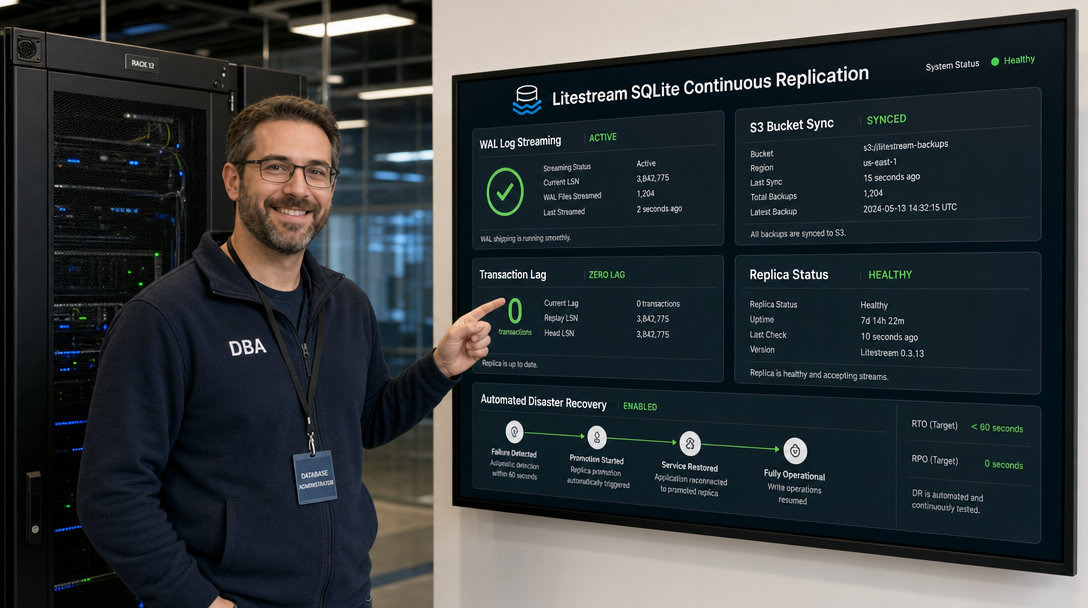
However, running stateful production workloads on SQLite presents a major operational dilemma: disaster recovery and live backups. Traditional file-level backup tools (such as copying the .db file or taking periodic filesystem snapshots) frequently cause silent database corruption if write transactions occur mid-copy. Furthermore, traditional cron-based dumps only capture snapshots hours apart, risking substantial data loss in a crash. Litestream completely eliminates this vulnerability. By hooking into SQLite’s Write-Ahead Log (WAL), Litestream streams database changes continuously to any S3-compatible object storage (AWS S3, MinIO, Cloudflare R2, Garage S3, or Backblaze B2) at sub-second intervals with zero downtime and negligible CPU overhead. In this guide, we explore how to deploy Litestream in Docker Compose using production-grade sidecar patterns, configure automatic point-in-time recovery (PITR), and verify disaster recovery workflows.
How Litestream Works: WAL Shadowing & Snapshotting
To understand why Litestream is fundamentally safer than traditional backup scripts, we must examine SQLite’s Write-Ahead Log (WAL) mode. In WAL mode, SQLite writes new transactions sequentially to a companion file (database.db-wal) rather than modifying the main database.db file directly. Periodically, SQLite performs a “checkpoint” that merges WAL changes back into the primary database.
Litestream runs as a dedicated daemon alongside your application container. It constantly monitors the SQLite WAL file, intercepts newly committed transaction frames, and streams them upstream to an encrypted S3 bucket in 10-second micro-batches. Because Litestream only reads committed WAL pages, it never locks your application’s read or write queries. In the event of a catastrophic server failure, Litestream downloads the latest base snapshot from S3 and replays WAL frames in exact chronological sequence, restoring your database to the exact state it was in seconds before the outage.
+-----------------------------------------------------------------------------+
|                                APPLICATION POD                              |
|                                                                             |
|  +----------------------------+             +----------------------------+  |
|  |   App / Microservice       |             |     Litestream Daemon      |  |
|  |   (PocketBase / Python)    |             |       (Sidecar / Init)     |  |
|  +----------------------------+             +----------------------------+  |
|                |                                          |                 |
|       Writes Transactions                         Continuous WAL Polling    |
|                |                                          |                 |
|                v                                          v                 |
|      +-------------------------------------------------------------+        |
|      |               Shared Host Volume (/data)                    |        |
|      |                                                             |        |
|      |  - app.db       (Base SQLite database file)                 |        |
|      |  - app.db-wal   (Write-Ahead Log: Active committed frames)  |        |
|      |  - app.db-shm   (Shared memory index lock)                  |        |
|      +-------------------------------------------------------------+        |
+-----------------------------------------------------------------------------+
                                                            |
                                        Sub-Second Streaming (HTTPS)
                                                            v
                                            +-------------------------------+
                                            |   S3-Compatible Object Store  |
                                            | (Garage / MinIO / R2 / AWS S3)|
                                            |                               |
                                            |  /backups/generations/        |
                                            |    - 00000000/wal/            |
                                            |    - 00000000/snapshots/      |
                                            +-------------------------------+
Prerequisites & Infrastructure Preparation
Before launching our containers, ensure your Linux environment fulfills the following criteria:
- Linux Host: Ubuntu 24.04, Debian 12, or AlmaLinux 9 with Docker Engine 25.x+ and Docker Compose v2+.
- S3 Storage Target: An active S3-compatible bucket (e.g., hosted locally via Garage S3 or MinIO, or remotely on Cloudflare R2 / AWS S3) with programmatic access credentials (Access Key and Secret Key).
- Storage Performance: Fast local NVMe/SSD storage for the shared Docker volume hosting the SQLite database to allow smooth WAL concurrency.
Create the local directory layout on your host server:
sudo mkdir -p /opt/litestream-stack/{config,data}
sudo chown -R 1000:1000 /opt/litestream-stack
cd /opt/litestream-stack
Litestream Configuration: litestream.yml
Create the Litestream configuration file at /opt/litestream-stack/config/litestream.yml. In this example, we configure continuous WAL replication pointing to an S3 bucket named homelab-sqlite-backups:
# /opt/litestream-stack/config/litestream.yml
dbs:
  - path: /data/app.db
    replicas:
      - type: s3
        bucket: homelab-sqlite-backups
        path: production-app/app.db
        endpoint: https://s3.homelab.internal
        region: eu-central-1
        sync-interval: 10s
        snapshot-interval: 24h
        retention: 168h  # Retain snapshots and WAL history for 7 days
        validation-interval: 1h
Configuration breakdown:
path: The absolute container path to the SQLite database file monitored by Litestream.sync-interval = 10s: Litestream buffers WAL frames and uploads them to S3 every 10 seconds (or immediately if the buffer exceeds size thresholds).snapshot-interval = 24h: Automatically creates a full baseline snapshot every 24 hours. Old WAL frames prior to the snapshot are safely pruned according to the retention window.retention = 168h: Enforces a 7-day retention policy, enabling point-in-time recovery back to any timestamp within the last week.validation-interval = 1h: Performs periodic integrity checks against the remote S3 replica to guarantee that no frames have been dropped or corrupted.
Docker Compose Deployment: The Production Sidecar Pattern
When orchestrating Litestream in Docker Compose, there are two primary architectures: wrapping Litestream directly inside your application’s entrypoint script, or running Litestream as an independent sidecar container sharing a named volume. The sidecar pattern is vastly superior for production: it requires zero modifications to official third-party application Docker images (such as PocketBase or Vaultwarden) and isolates database lifecycle operations.
Create the docker-compose.yml file in /opt/litestream-stack/docker-compose.yml:
services:
  # Litestream init container: Restores database from S3 if local volume is empty
  litestream-restore:
    image: litestream/litestream:0.3.13
    container_name: litestream-init
    volumes:
      - db-data:/data
      - /opt/litestream-stack/config/litestream.yml:/etc/litestream.yml:ro
    environment:
      - LITESTREAM_ACCESS_KEY_ID=GK4f019b8example
      - LITESTREAM_SECRET_ACCESS_KEY=79bc3e81examplekey
    entrypoint: ["litestream", "restore", "-if-replica-exists", "-config", "/etc/litestream.yml", "/data/app.db"]
    restart: "no"

  # Core Application (PocketBase example running SQLite)
  app:
    image: ghcr.io/muchobien/pocketbase:latest
    container_name: production-app
    restart: unless-stopped
    depends_on:
      litestream-restore:
        condition: service_completed_successfully
    ports:
      - "127.0.0.1:8090:8090"
    volumes:
      - db-data:/pb_data
    environment:
      - TZ=Europe/Berlin
    healthcheck:
      test: ["CMD-SHELL", "wget -q --spider http://127.0.0.1:8090/api/health || exit 1"]
      interval: 15s
      timeout: 5s
      retries: 3

  # Litestream sidecar: Streams WAL changes to S3 in real-time
  litestream-replicate:
    image: litestream/litestream:0.3.13
    container_name: litestream-sidecar
    restart: unless-stopped
    depends_on:
      - app
    volumes:
      - db-data:/data
      - /opt/litestream-stack/config/litestream.yml:/etc/litestream.yml:ro
    environment:
      - LITESTREAM_ACCESS_KEY_ID=GK4f019b8example
      - LITESTREAM_SECRET_ACCESS_KEY=79bc3e81examplekey
    entrypoint: ["litestream", "replicate", "-config", "/etc/litestream.yml"]
    logging:
      driver: "json-file"
      options:
        max-size: "10m"
        max-file: "3"

volumes:
  db-data:
    name: litestream-db-data
Examine how the startup lifecycle functions:
- Phase 1 (Restore Check): The
litestream-restoreinit container starts first. If the localdb-datavolume is empty (e.g., after catastrophic server replacement), Litestream queries the S3 replica and restores the database down to the most recent transaction before exiting cleanly. - Phase 2 (App Startup): Once restoration completes, the main application container starts and opens the SQLite database.
- Phase 3 (Continuous Sync): The
litestream-replicatesidecar attaches to the volume and streams all ongoing WAL transactions to your S3 bucket.
Launch the environment:
cd /opt/litestream-stack
docker compose up -d
Enabling WAL Mode & Verifying Active Replication
For Litestream to function, your SQLite database must be operating in WAL journaling mode. While many modern frameworks (PocketBase, Django 5+, SQLAlchemy) enable WAL by default, you can verify and enforce WAL mode manually using the SQLite CLI:
# Execute query against SQLite file in the shared volume
docker compose exec app sqlite3 /pb_data/data.db "PRAGMA journal_mode=WAL;"

# Expected output:
# wal
Now, inspect Litestream’s active replication state:
docker compose exec litestream-replicate litestream databases -config /etc/litestream.yml
The output confirms active WAL synchronization:
path            replicas
/data/app.db    s3://homelab-sqlite-backups/production-app/app.db (sync: 10s, pos: 00000000:00000042)
You can also inspect the remote S3 replica generations and snapshots stored in your object storage:
docker compose exec litestream-replicate litestream generations -config /etc/litestream.yml /data/app.db
Disaster Recovery & Point-In-Time Restoration
The true test of any backup engine is recovery. Let’s simulate a total catastrophic failure where the local host volume is completely deleted.
1. Simulating Data Destruction
# Stop all running containers
docker compose down

# Destroy the Docker volume containing the database
docker volume rm litestream-db-data
2. Executing Automated Recovery
Bring the stack back up. Watch the logs as Litestream detects the missing database, pulls the latest snapshot from S3, applies every committed WAL transaction frame, and hands the restored file to the application:
docker compose up -d
docker compose logs litestream-restore
The logs will confirm the successful restoration:
litestream-init | restoring /data/app.db from s3://homelab-sqlite-backups/production-app/app.db
litestream-init | downloaded snapshot in 1.12s (14.2 MB)
litestream-init | applied 34 WAL segments up to timestamp 2026-10-07T12:00:00Z
litestream-init | restore complete in 1.48s
3. Point-in-Time Recovery (PITR) to a Specific Minute
If an erroneous migration or accidental table deletion occurred at a known time (e.g., 14:32:00 UTC), you can restore the database to an exact historical second using the -timestamp flag:
docker compose run --rm litestream-replicate litestream restore \
  -config /etc/litestream.yml \
  -timestamp "2026-10-07T14:30:00Z" \
  -o /data/recovered_app.db \
  /data/app.db
Security Hardening & Production Best Practices
Implement the following operational guidelines for enterprise-grade durability:
- Enforce Least-Privilege IAM Policies: Create a dedicated S3 access key scoped strictly to your Litestream bucket prefix. Deny global admin rights and grant only
s3:PutObject,s3:GetObject,s3:ListBucket, ands3:DeleteObject(needed for retention pruning). - Protect Shared Memory (.db-shm): Never mount SQLite volumes over network filesystems like NFS or SMB/CIFS. SQLite’s WAL implementation relies on POSIX shared memory locks (
.shmfiles), which are prone to silent lock failures over network shares. Always store the database volume on local ext4, XFS, or ZFS filesystems. - S3 Object Versioning: Enable S3 bucket versioning on your remote object storage. This ensures that even if malicious software or ransomware accesses your credentials and attempts to delete bucket objects, previous generations and snapshots remain recoverable.
- Monitor Sync Latency: Expose Litestream Prometheus metrics by adding
addr: ":9090"tolitestream.yml. Monitor thelitestream_replica_wal_lagmetric in Grafana to alert you immediately if network disconnection delays S3 uploads.
Troubleshooting Common Deployment Issues
Here are three frequent issues encountered when implementing continuous Litestream replication, accompanied by exact resolutions:
1. Error: “cannot replicate, database not in WAL mode”
Symptom: Litestream logs display database not in WAL mode: journal_mode=delete and refuses to start replication.
Root Cause: The application initialized SQLite using standard rollback journal mode (DELETE, MEMORY, or OFF), which does not generate the WAL transaction stream required by Litestream.
Solution: Open the database using SQLite CLI and persist WAL mode: sqlite3 /path/to/app.db "PRAGMA journal_mode=WAL;". Note that WAL mode is persistent across restarts unless explicitly changed by an application connection string.
2. Error: “SignatureDoesNotMatch or 403 Access Denied during S3 PUT”
Symptom: Litestream repeatedly retries uploading WAL segments with exponential backoff, failing with HTTP 403 Forbidden.
Root Cause: Either your S3 credentials are invalid, the bucket region in litestream.yml does not match the provider’s actual region, or the S3 endpoint URL protocol is mismatched (HTTP instead of HTTPS).
Solution: Test credentials directly from the host using the AWS CLI or MinIO client (aws --endpoint-url https://s3.homelab.internal s3 ls s3://homelab-sqlite-backups). For local providers like MinIO or Garage, explicitly set region: us-east-1 (the standard default region for local S3 servers).
3. Error: “database is locked (5) / SQLITE_BUSY”
Symptom: The application encounters intermittent “database is locked” errors during heavy concurrent write spikes.
Root Cause: SQLite busy timeout is configured too low, or an external process (like an antivirus scanner, desktop backup tool, or improper Docker volume mapping) is holding an exclusive file lock on app.db-wal.
Solution: Set SQLite busy timeout to at least 5000ms in your application configuration (PRAGMA busy_timeout = 5000;). Ensure no other container or host cron script accesses the SQLite files while Litestream and the application are actively running.
Conclusion
By pairing SQLite’s unmatched speed and zero-maintenance operational simplicity with Litestream’s continuous WAL replication, developers and homelab sysadmins gain the best of all worlds: instantaneous embedded database queries with enterprise-grade, point-in-time disaster recovery. With this Docker Compose sidecar architecture, your self-hosted databases are continuously streamed to resilient S3 object storage, ensuring that hardware crashes, volume corruptions, or accidental deletions can be resolved in seconds with practically zero data loss.

Hi, I’m Mark, the author of Clever IT Solutions: Mastering Technology for Success. I am passionate about empowering individuals to navigate the ever-changing world of information technology. With years of experience in the industry, I have honed my skills and knowledge to share with you. At Clever IT Solutions, we are dedicated to teaching you how to tackle any IT challenge, helping you stay ahead in today’s digital world. From troubleshooting common issues to mastering complex technologies, I am here to guide you every step of the way. Join me on this journey as we unlock the secrets to IT success.