Kubernetes has become the standard orchestrator for containerized workloads. At the heart of running stateless applications reliably in Kubernetes lies the Deployment resource. While managing individual Pods directly is technically possible, Deployments automate replica management, rolling updates, rollbacks, and self-healing at scale.
In this guide, we dive deep into Kubernetes Deployments. We’ll explore how Deployments interact with ReplicaSets, how zero-downtime rolling updates work under the hood, and how to configure strategies, health checks, and rollbacks for production-grade reliability.
What is a Kubernetes Deployment?
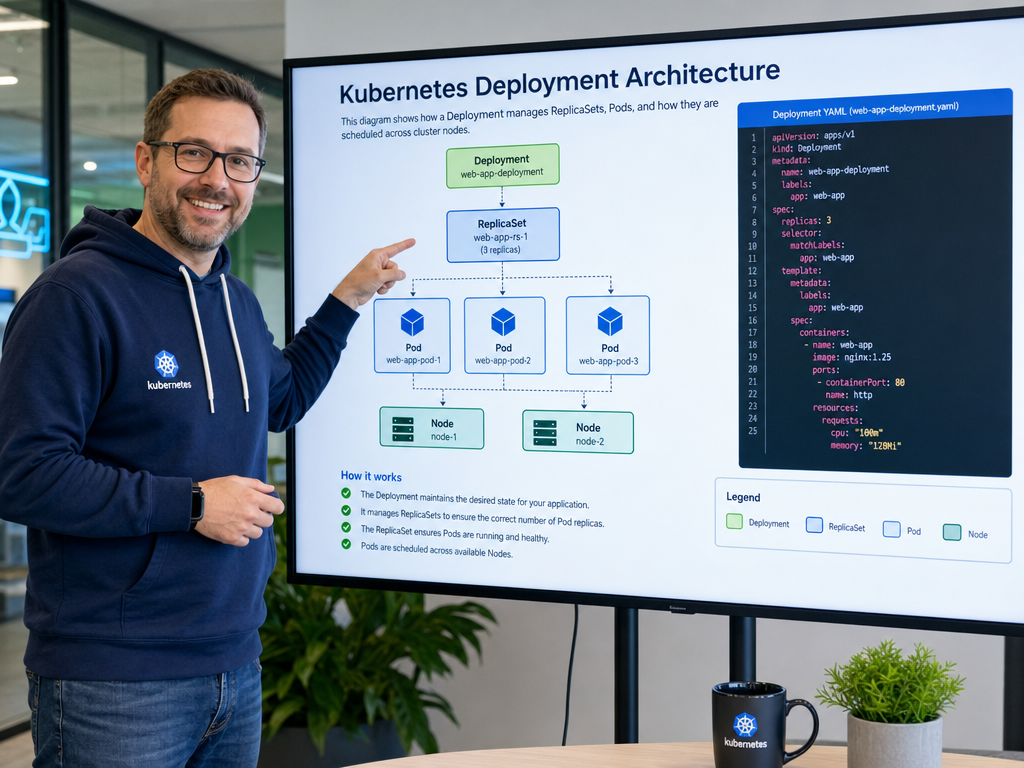
A Kubernetes Deployment is a declarative API object that manages a set of identical Pods via a controller. Instead of creating and managing individual Pods or ReplicaSets manually, you declare the desired state in a Deployment manifest, and the Deployment controller reconciles current cluster state to match your specification.
The Deployment Hierarchy: Deployment → ReplicaSet → Pod
Understanding the hierarchy is crucial for troubleshooting:
- Deployment: Defines the higher-level lifecycle, rollout strategy, revisions, and template for your workload.
- ReplicaSet: Managed automatically by the Deployment. It ensures that a specified number of Pod replicas are running at any given moment.
- Pod: The smallest deployable unit in Kubernetes containing one or more containers sharing network and storage namespaces.
When you update a Deployment (e.g., updating a container image), the Deployment controller creates a new ReplicaSet and gradually scales it up while scaling down the old ReplicaSet. This mechanism provides seamless rolling updates without service interruption.
Anatomy of a Deployment Manifest
Here is a production-ready Deployment manifest for an Nginx web application:
apiVersion: apps/v1
kind: Deployment
metadata:
  name: web-app
  namespace: default
  labels:
    app.kubernetes.io/name: web-app
    app.kubernetes.io/tier: frontend
spec:
  replicas: 3
  revisionHistoryLimit: 5
  selector:
    matchLabels:
      app.kubernetes.io/name: web-app
  strategy:
    type: RollingUpdate
    rollingUpdate:
      maxSurge: 25%
      maxUnavailable: 0
  template:
    metadata:
      labels:
        app.kubernetes.io/name: web-app
    spec:
      containers:
      - name: nginx
        image: nginx:1.25.3-alpine
        ports:
        - containerPort: 80
          name: http
        resources:
          requests:
            cpu: 100m
            memory: 128Mi
          limits:
            cpu: 500m
            memory: 256Mi
        readinessProbe:
          httpGet:
            path: /healthz
            port: 80
          initialDelaySeconds: 5
          periodSeconds: 10
        livenessProbe:
          httpGet:
            path: /healthz
            port: 80
          initialDelaySeconds: 15
          periodSeconds: 20
Rollout Strategies: RollingUpdate vs. Recreate
Kubernetes supports two primary deployment strategies defined under spec.strategy.type:
1. RollingUpdate (Default)
Pods running the old version are incrementally replaced with new Pods. With properly tuned parameters, your service experiences zero downtime during deployments.
Key configuration parameters:
maxSurge: How many Pods above the desired replica count can be created during the update (e.g.,25%or1).maxUnavailable: The maximum number of Pods that can be unavailable during the update process. Setting this to0guarantees that available capacity never drops below 100%.
2. Recreate
All existing Pods are terminated before new Pods are created. This introduces downtime between version changes, but is required for applications that cannot handle two distinct database schemas or state versions running concurrently.
spec:
  strategy:
    type: Recreate
Managing Deployments: Essential CLI Commands
Here are the fundamental commands for day-to-day deployment management:
Applying and Checking Status
# Create or update deployment
kubectl apply -f deployment.yaml

# Check rollout status
kubectl rollout status deployment/web-app

# List active deployments and pod counts
kubectl get deployments -l app.kubernetes.io/name=web-app
Updating Images and Resources
# Update image directly via CLI
kubectl set image deployment/web-app nginx=nginx:1.26.0-alpine --record

# Scale deployment replicas
kubectl scale deployment/web-app --replicas=5
Rollout History, Pause, and Rollback
If a new release introduces errors, Kubernetes allows instantaneous rollbacks to any recorded revision:
# View revision history
kubectl rollout history deployment/web-app

# Undo the last rollout
kubectl rollout undo deployment/web-app

# Roll back to a specific revision
kubectl rollout undo deployment/web-app --to-revision=2

# Pause and resume rollouts (useful for canary testing)
kubectl rollout pause deployment/web-app
kubectl rollout resume deployment/web-app
Health Probes: The Backbone of Zero-Downtime Rollouts
Rolling updates only protect against downtime if Kubernetes knows whether a new Pod is actually healthy and ready to accept traffic. Always configure both readiness and liveness probes:
- Readiness Probe: Determines if a Pod is ready to receive network traffic. During a rolling update, the old Pod is not terminated until the new Pod’s readiness probe succeeds.
- Liveness Probe: Detects whether an application is stuck or in an unrecoverable state. If this probe fails repeatedly, the kubelet restarts the container.
- Startup Probe: For legacy or slow-starting applications, ensures that liveness probes don’t prematurely kill containers before initial startup completes.
Production Best Practices
- Always Set Resource Requests and Limits: Prevent noisy neighbors from exhausting node CPU and memory.
- Configure Disruption Budgets (PDBs): Use
PodDisruptionBudgetto guarantee minimum available replicas during voluntary node drains or cluster upgrades. - Keep Selector Labels Immutable: Do not modify
spec.selector.matchLabelson an existing Deployment; create a new Deployment if label redesign is needed. - Set
revisionHistoryLimit: Limit the number of old ReplicaSets stored in etcd (default is 10, typically 3-5 is sufficient). - Never Deploy Without Probes: Without readiness probes, Kubernetes considers a container ready immediately upon process launch, which causes dropped traffic during rollouts.
Summary
Kubernetes Deployments provide the reliability and declarative control necessary for running mission-critical microservices. By combining declarative YAML specs, tuned rolling update policies, and well-designed health checks, engineering teams achieve zero-downtime deployments and rapid disaster recovery.

Hi, I’m Mark, the author of Clever IT Solutions: Mastering Technology for Success. I am passionate about empowering individuals to navigate the ever-changing world of information technology. With years of experience in the industry, I have honed my skills and knowledge to share with you. At Clever IT Solutions, we are dedicated to teaching you how to tackle any IT challenge, helping you stay ahead in today’s digital world. From troubleshooting common issues to mastering complex technologies, I am here to guide you every step of the way. Join me on this journey as we unlock the secrets to IT success.