Traditional full-text search engines and relational databases rely on exact keyword matches, token stemming, and inverted indexes (such as BM25). While effective for finding specific terms or identifiers, traditional search fails completely when users query by concept, intent, or synonymous meaning. If an engineer searches for “mitigating server thermal throttling,” a lexical search will miss documentation discussing “fan speed curves and CPU cooling optimization” simply because none of the exact words match.
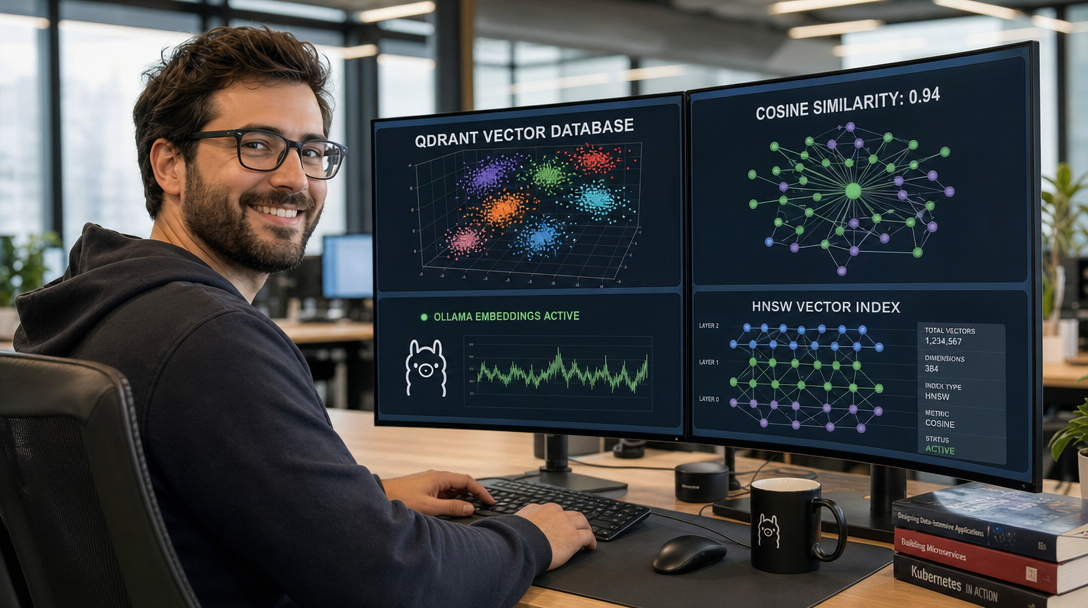
Vector databases solve this fundamental limitation by converting unstructured data—such as documentation, source code, support tickets, and chat histories—into dense mathematical vectors (embeddings) generated by neural networks. In this high-dimensional vector space, semantically similar concepts cluster together regardless of specific phrasing. Qdrant is an open-source, enterprise-grade vector similarity search engine written in Rust. Known for its ultra-low search latencies, advanced payload filtering, and efficient memory management, Qdrant is the premier choice for modern Retrieval-Augmented Generation (RAG) and autonomous AI agent workflows.
By pairing Qdrant with Ollama in Docker Compose, you can build a completely local, self-hosted semantic search engine. This setup eliminates cloud API costs, eliminates vendor lock-in, and guarantees that proprietary corporate knowledge never leaves your infrastructure.
Architecture: The Local Neural Search Engine
A production semantic search pipeline consists of two distinct stages: Embedding Ingestion and Nearest Neighbor Retrieval.
+-----------------------------------------------------------------------------------+
|                         INGESTION / EMBEDDING PIPELINE                            |
+-----------------------------------------------------------------------------------+
  Raw Text / Documents                               Local Dense Vector (Float32)
  [ "Database backup failed" ]                       [ 0.0412, -0.8912, 0.2319, ... ]
            |                                                      |
            v                                                      v
  +--------------------+        Ollama REST API          +--------------------+
  | Application Client | ------------------------------> |   Ollama Engine    |
  |  (Python / Go / JS)| <------------------------------ |  (Model: bge-m3)   |
  +--------------------+    1024-Dimensional Vector      +--------------------+
            |
            | HTTP REST / gRPC Upsert (Vector + Payload JSON)
            v
+-----------------------------------------------------------------------------------+
|                            QDRANT VECTOR DATABASE (RUST)                          |
|                                                                                   |
|  +------------------------------------+  +-------------------------------------+  |
|  |     HNSW GRAPH INDEX ENGINE        |  |        PAYLOAD STORAGE & FILTER     |  |
|  |  - Cosine Distance Evaluation      |  |  - Filter by category, tenant_id,   |  |
|  |  - Multi-layer Navigation Graphs   |  |    timestamp, or custom JSON keys   |  |
|  +------------------------------------+  +-------------------------------------+  |
|                                         |                                         |
|                                         v                                         |
|                          +-----------------------------+                          |
|                          | Persistent Storage On-Disk  |                          |
|                          | (/qdrant/storage)           |                          |
|                          +-----------------------------+                          |
+-----------------------------------------------------------------------------------+
            |
            | Top-K Nearest Neighbors (e.g., Score: 0.9412)
            v
+--------------------+
| Semantic Search UI | ===> Relevant Documents Retrieved in < 5 Milliseconds
+--------------------+
Key architectural advantages of this architecture:
- Rust-Powered Efficiency: Qdrant provides native multi-threading, SIMD hardware acceleration (AVX-512 and ARM NEON), and minimal memory overhead.
- Filtered HNSW Search: Unlike standard Approximate Nearest Neighbor (ANN) libraries that filter results after vector retrieval, Qdrant applies payload filters directly during graph traversal, preventing search recall degradation.
- Air-Gapped Privacy: Ollama runs state-of-the-art embedding models (such as
bge-m3ornomic-embed-text) locally on CPU or NVIDIA GPUs without external telemetry. - Dual Interface Protocol: Supports high-speed JSON REST on port
6333and binary streaming gRPC on port6334for enterprise microservices.
Step 1: Directory Setup & Security Keys
Create a dedicated workspace on your host filesystem for Qdrant vector storage and configuration files:
sudo mkdir -p /opt/qdrant/storage
sudo mkdir -p /opt/qdrant/config
sudo mkdir -p /opt/ollama/data

sudo chown -R 1000:1000 /opt/qdrant
sudo chmod -R 755 /opt/qdrant
Generate a secure, random API key to protect Qdrant’s REST and gRPC endpoints from unauthorized access:
# Generate a 32-character random authentication token
openssl rand -hex 16
Step 2: Production Docker Compose Configuration
We deploy Qdrant alongside Ollama in an isolated Docker network. If your server is equipped with an NVIDIA GPU, pass the GPU device to Ollama to accelerate embedding calculations.
Create /opt/qdrant/docker-compose.yml:
services:
  qdrant:
    image: qdrant/qdrant:latest
    container_name: qdrant
    restart: unless-stopped
    ports:
      - "6333:6333" # HTTP REST API & Web Dashboard
      - "6334:6334" # High-Throughput gRPC API
    environment:
      - QDRANT__SERVICE__API_KEY=your_generated_secret_api_key_here
      - QDRANT__SERVICE__ENABLE_CORS=true
      - QDRANT__LOG_LEVEL=INFO
      - QDRANT__STORAGE__ON_DISK_PAYLOAD=true
    volumes:
      - /opt/qdrant/storage:/qdrant/storage:z
      - /opt/qdrant/config/config.yaml:/qdrant/config/production.yaml:ro
    security_opt:
      - no-new-privileges:true
    logging:
      driver: "json-file"
      options:
        max-size: "10m"
        max-file: "3"

  ollama:
    image: ollama/ollama:latest
    container_name: ollama
    restart: unless-stopped
    ports:
      - "11434:11434" # Ollama API
    environment:
      - OLLAMA_KEEP_ALIVE=24h # Keep embedding model pinned in RAM/VRAM
    volumes:
      - /opt/ollama/data:/root/.ollama
    # Uncomment the following block if using NVIDIA GPU acceleration:
    # deploy:
    #   resources:
    #     reservations:
    #       devices:
    #         - driver: nvidia
    #           count: all
    #           capabilities: [gpu]
    security_opt:
      - no-new-privileges:true
    logging:
      driver: "json-file"
      options:
        max-size: "10m"
        max-file: "3"

networks:
  default:
    name: ai-network
Next, create the production configuration file at /opt/qdrant/config/config.yaml to tune HNSW graph indexing parameters:
service:
  max_request_size_mb: 32
  max_workers: 4

storage:
  # Enable on-disk payload storage to save system RAM
  on_disk_payload: true
  optimizers:
    deleted_threshold: 0.2
    vacuum_min_vector_number: 1000
    default_segment_number: 2
    indexing_threshold: 10000

# Global HNSW Defaults
hnsw_index:
  m: 16                # Number of edges per node in index graph
  ef_construct: 100     # Neighbors evaluated during index building
  full_scan_threshold: 10000
  on_disk: false       # Keep HNSW index in RAM for sub-millisecond retrieval
Launch the container stack:
cd /opt/qdrant
docker compose up -d

# Verify both containers are running healthy
docker compose ps
Step 3: Initializing Ollama Local Embedding Models
While large language models (LLMs) generate natural language responses, specialized embedding models are specifically trained to produce high-density vector representations. For semantic search, BAAI’s BGE-M3 and Nomic Embed Text are current industry benchmarks.
Download the high-performance multi-lingual embedding model inside Ollama:
# Pull the state-of-the-art BGE-M3 model (1024-dimensional embeddings, 8k context)
docker compose exec ollama ollama pull bge-m3

# Verify model availability
docker compose exec ollama ollama list
Test the embedding generation endpoint using curl to verify dimensionality:
curl -s http://localhost:11434/api/embeddings -d '{
  "model": "bge-m3",
  "prompt": "Zero trust network architecture and WireGuard VPN tunnels"
}' | jq '.embedding | length'

# Expected output: 1024
Step 4: Initializing a Vector Collection in Qdrant
In Qdrant, vectors are organized into Collections. Each collection defines the vector dimension, distance metric (Cosine, Dot Product, or Euclidean), and payload schema.
Create a new collection named knowledge_base configured specifically for bge-m3‘s 1024-dimensional vectors:
curl -X PUT "http://localhost:6333/collections/knowledge_base" \
  -H "api-key: your_generated_secret_api_key_here" \
  -H "Content-Type: application/json" \
  -d '{
    "vectors": {
      "size": 1024,
      "distance": "Cosine"
    },
    "optimizers_config": {
      "default_segment_number": 2
    },
    "replication_factor": 1
  }'
Verify that the collection is initialized and active:
curl -s "http://localhost:6333/collections/knowledge_base" \
  -H "api-key: your_generated_secret_api_key_here" | jq .
You can also access Qdrant’s built-in web management console by opening http://<server-ip>:6333/dashboard in your browser and entering your API key. The dashboard displays visual telemetry, active collections, point counts, and segment distribution.
Step 5: Automated Ingestion & Semantic Query Pipeline (Python)
To demonstrate the end-to-end workflow, we will create a complete Python script that ingests technical documentation into Qdrant using Ollama embeddings and performs fast semantic similarity searches with metadata filtering.
Install the official client libraries on your host or development workstation:
pip install qdrant-client requestsCreate semantic_search.py:
import requests
from qdrant_client import QdrantClient
from qdrant_client.models import PointStruct, Distance, VectorParams, Filter, FieldCondition, MatchValue

# Configuration
QDRANT_HOST = "http://localhost:6333"
QDRANT_API_KEY = "your_generated_secret_api_key_here"
OLLAMA_URL = "http://localhost:11434/api/embeddings"
EMBEDDING_MODEL = "bge-m3"
COLLECTION_NAME = "knowledge_base"

# Initialize Qdrant Client
client = QdrantClient(url=QDRANT_HOST, api_key=QDRANT_API_KEY)

def generate_embedding(text: str) -> list:
    """Generate dense vector embedding via local Ollama instance."""
    response = requests.post(
        OLLAMA_URL,
        json={"model": EMBEDDING_MODEL, "prompt": text}
    )
    response.raise_for_status()
    return response.json()["embedding"]

# Sample Knowledge Base Records
documents = [
    {
        "id": 1,
        "title": "Configuring WireGuard VPN",
        "category": "networking",
        "content": "WireGuard is an extremely simple yet fast and modern VPN that utilizes state-of-the-art cryptography like Curve25519 and ChaCha20."
    },
    {
        "id": 2,
        "title": "Optimizing ZFS ARC Cache",
        "category": "storage",
        "content": "ZFS Adaptive Replacement Cache stores recently and frequently used data blocks in host RAM to minimize physical drive I/O latency."
    },
    {
        "id": 3,
        "title": "Hardening SSH on Debian 12",
        "category": "security",
        "content": "Disable root login, enforce public key authentication with Ed25519 keys, and implement Fail2ban or CrowdSec for brute-force protection."
    },
    {
        "id": 4,
        "title": "Automating Container Updates with Watchtower",
        "category": "devops",
        "content": "Watchtower monitors active Docker containers and automatically pulls newer base images from registries, triggering graceful restarts."
    }
]

print("--- Step 1: Ingesting Documents into Qdrant ---")
points = []
for doc in documents:
    print(f"Embedding document: {doc['title']}")
    vector = generate_embedding(doc["content"])
    points.append(
        PointStruct(
            id=doc["id"],
            vector=vector,
            payload={
                "title": doc["title"],
                "category": doc["category"],
                "content": doc["content"]
            }
        )
    )

# Upsert points into Qdrant
client.upsert(collection_name=COLLECTION_NAME, points=points)
print(f"Successfully upserted {len(points)} vectors.\n")

print("--- Step 2: Performing Semantic Similarity Search ---")
# Notice: None of these query words appear verbatim in Document 1!
query_text = "How do I build an encrypted point-to-point tunnel between servers?"
print(f"User Query: '{query_text}'")

query_vector = generate_embedding(query_text)

# Search nearest neighbors with optional category filter
search_results = client.query_points(
    collection_name=COLLECTION_NAME,
    query=query_vector,
    limit=2,
    query_filter=Filter(
        must=[
            FieldCondition(
                key="category",
                match=MatchValue(value="networking")
            )
        ]
    )
)

print("\n--- Search Results ---")
for scored_point in search_results.points:
    print(f"Score: {scored_point.score:.4f} | Title: {scored_point.payload['title']}")
    print(f"Content: {scored_point.payload['content']}\n")
Run the script to observe real-time semantic discovery:
python3 semantic_search.pyThe query “How do I build an encrypted point-to-point tunnel between servers?” immediately matches “Configuring WireGuard VPN” with a Cosine Similarity score above 0.85, demonstrating conceptual comprehension without literal keyword matches.
Production Tuning & Memory Optimization
As your vector dataset scales from thousands to millions of embeddings, raw vector storage can rapidly consume gigabytes of system memory. Apply these production optimizations in Qdrant:
1. Scalar Quantization (4x Memory Reduction)
By default, Qdrant stores vectors using 32-bit floating-point numbers (float32, 4 bytes per dimension). With Scalar Quantization, vectors are compressed to 8-bit integers (int8, 1 byte per dimension), cutting RAM consumption by 75% while preserving >99% search recall accuracy.
Apply quantization to your collection via the REST API:
curl -X PATCH "http://localhost:6333/collections/knowledge_base" \
  -H "api-key: your_generated_secret_api_key_here" \
  -H "Content-Type: application/json" \
  -d '{
    "quantization_config": {
      "scalar": {
        "type": "int8",
        "quantile": 0.99,
        "always_ram": true
      }
    }
  }'
2. On-Disk Vector Storage
If your dataset exceeds total host physical RAM, instruct Qdrant to store raw vector payloads on NVMe disk while maintaining only the lightweight quantized HNSW navigation graph in RAM:
{
  "vectors": {
    "size": 1024,
    "distance": "Cosine",
    "on_disk": true
  }
}
Security Hardening Best Practices
- Isolate API Access: Never bind Qdrant without setting
QDRANT__SERVICE__API_KEY. Without an API key, Qdrant allows unauthenticated root access to delete collections and dump all stored vector payloads. - Read-Only API Keys for Frontends: Qdrant supports granular API keys. Generate restricted read-only tokens for user-facing search applications while reserving the master key for internal ingestion pipelines.
- Reverse Proxy with TLS: Terminate SSL/TLS using Caddy or Traefik in front of port
6333to prevent cleartext transmission of embeddings and authentication headers across public networks. - Automated Snapshots: Leverage Qdrant’s snapshot API to trigger consistent point-in-time backups to S3 object storage (e.g., MinIO):
curl -X POST "http://localhost:6333/collections/knowledge_base/snapshots" \
  -H "api-key: your_generated_secret_api_key_here"
Troubleshooting: Common Vector Database Issues
1. Error: “Vector dimension error: expected 1024, got 768”
Symptom: Upserting points fails with HTTP 400 and a vector dimension mismatch error.
Root Cause: The embedding model used by Ollama produces vectors with a different dimensionality than the collection was configured for (e.g., switching from bge-m3 (1024 dims) to nomic-embed-text (768 dims)).
Solution: A collection’s vector dimension cannot be altered after creation. Verify your model’s exact dimension using Ollama’s API, and create a dedicated collection corresponding to that specific dimension size.
2. Issue: Container Killed by Linux Kernel OOM Killer
Symptom: The Qdrant container abruptly crashes during batch indexing, with dmesg reporting Out of memory: Killed process.
Root Cause: Building the HNSW graph with high ef_construct values on large batch sizes creates sudden RAM spikes.
Solution: Lower your batch upsert chunk size (e.g., 250 points per request instead of 10,000), enable on_disk_payload: true, and configure scalar quantization.
3. Issue: Search Latency Spikes During Bulk Ingestion
Symptom: Query response times increase from 3 ms to 500 ms while documents are actively being ingested.
Root Cause: Background segment optimization and graph rebuilding consume all available CPU cores.
Solution: In production.yaml, adjust indexing_threshold to a higher value during bulk migrations so indexing triggers only after batch inserts conclude, or pin search worker threads using max_workers.
Conclusion
Integrating Qdrant with Ollama establishes a fast, privacy-preserving semantic search foundation directly within your Docker environment. By shifting from fragile keyword matching to high-dimensional neural vector similarity, your applications can understand context, intent, and nuance across complex technical knowledge bases.
With production HNSW graph tuning, scalar quantization for massive RAM savings, and seamless payload filtering, self-hosting your vector database infrastructure provides enterprise-class AI capabilities while keeping your data fully sovereign.

Hi, I’m Mark, the author of Clever IT Solutions: Mastering Technology for Success. I am passionate about empowering individuals to navigate the ever-changing world of information technology. With years of experience in the industry, I have honed my skills and knowledge to share with you. At Clever IT Solutions, we are dedicated to teaching you how to tackle any IT challenge, helping you stay ahead in today’s digital world. From troubleshooting common issues to mastering complex technologies, I am here to guide you every step of the way. Join me on this journey as we unlock the secrets to IT success.