Imagine a computing experience that combines raw power with incredible ease of use, right from the start. That’s the promise of the operating system we will explore. It answers a common frustration for many users: getting a powerful system ready for work and play without complex setup. This linux distribution is based fedora, but it’s supercharged for modern needs. Created by Thomas Crider, the developer behind Proton-GE, it comes pre-loaded with everything often missing from a fresh install. Think of it as a streamlined version designed for point-and-click simplicity. The project, first released in July 2022, has evolved significantly. Its latest version adopts a rolling release model, ensuring users always have the latest features. This makes it a powerful contender for gaming and creative tasks, as highlighted in this detailed look at its custom KDE Plasma. It stands apart from other specialized systems, such as the privacy-focused Tails OS, by prioritizing accessibility and performance for everyday use.
Our goal is to provide a clear, comprehensive guide. We will break down its features, installation, and ideal use cases. You will see why this distribution is a fantastic choice for both newcomers and seasoned pros.
Key Takeaways
- Built upon Fedora for stability but enhanced for immediate usability.
- Pre-configured for gaming and multimedia with essential codecs and drivers.
- Features a user-friendly graphical interface, minimizing command-line dependency.
- Developed by Thomas “Glorious Eggroll” Crider, known for Proton-GE.
- Adopted a rolling release model with its version 42 update for continuous updates.
- Ideal for Windows migrants and Linux enthusiasts seeking an optimized out-of-the-box experience.
Introduction to Nobara Linux
In the summer of 2022, a new player entered the Linux landscape with a focus on immediate usability and gaming performance. This operating system emerged from specific needs that its creator observed in the existing ecosystem.
Background and History
The project launched on July 10, 2022, when Thomas Crider identified pain points in standard Fedora installations. Over three years, the linux distro has evolved significantly, adopting a rolling release model with version 42 in May 2025.
This change marked a pivotal moment, replacing the point-release schedule and ensuring users receive continuous updates. The distribution maintains Fedora compatibility while adding custom modifications.
Developer Insights and Community Focus
Thomas Crider, known as “Glorious Eggroll,” brought extensive experience from his time as a Red Hat software engineer. His work on Proton-GE established his reputation in Linux gaming circles.
The official website at nobaraproject.org serves as the central hub for documentation and downloads. Community feedback has shaped the project‘s direction, creating a user-focused linux distro that stands apart from alternatives.
This approach mirrors other successful Linux tools like Webmin’s system administration capabilities, prioritizing accessibility without sacrificing power.
Exploring the Core Features and Enhancements
Delving into the technical foundation reveals why this distribution excels for modern computing needs. We will examine the specific enhancements that make it stand out from standard Fedora installations.
Tailored Gaming Experience and Pre-installed Packages
The gaming focus is immediately evident through the comprehensive selection of pre-installed packages. Users gain access to essential tools like WINE dependencies for Windows application compatibility and OBS Studio for streaming.
Third-party codecs and drivers come ready out-of-the-box. This eliminates the typical hunt for multimedia support that often plagues fresh Linux installations. The software selection ensures a complete gaming experience from the start.
Performance, Stability, and Kernel Improvements
Underneath the surface, extensive kernel modifications significantly boost performance. Zen patches enhance desktop responsiveness while specialized Steam Deck optimizations cater to handheld gaming.
The system maintains excellent stability through carefully tested patches and selective backports. Automatic NVIDIA GPU detection and driver installation streamline setup. These optimizations contribute to the impressive performance reported by users.
For detailed technical specifications, refer to Nobara Linux’s official documentation. The distribution’s approach to packages and kernel management represents a thoughtful balance between cutting-edge features and reliable operation.
What is nobara linux and Why It Stands Out
The true strength of this distribution lies in its commitment to removing technical friction for everyday computing. It bridges a critical gap by offering a complete, ready-to-use system that prioritizes accessibility without compromising power.
User-Friendly Interface and Proprietary Support
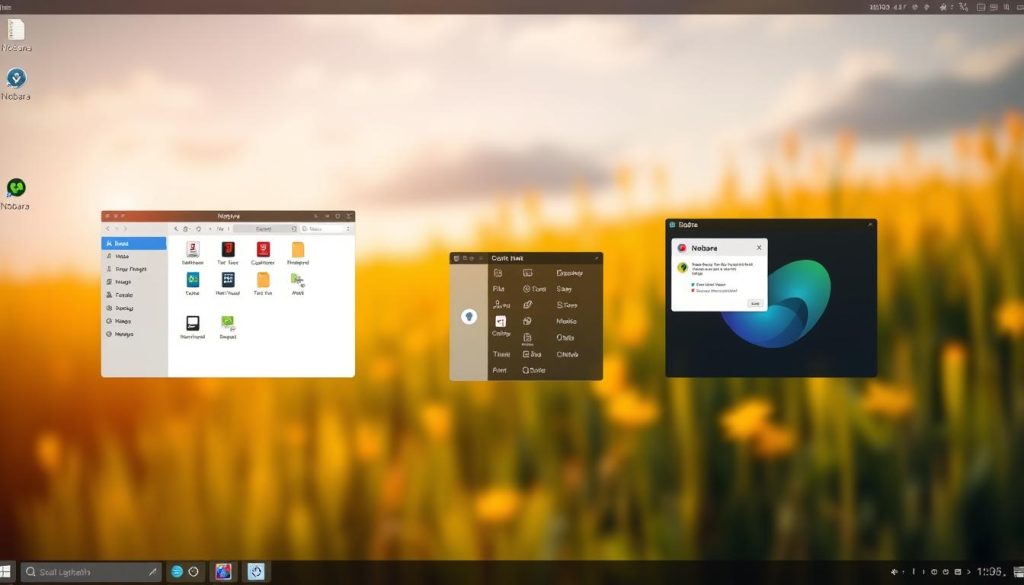
This distribution is explicitly designed for “point and click users.” It features a streamlined graphical interface that minimizes reliance on the command line. Automated driver detection and installation are central to this approach.
Essential proprietary drivers, like those for NVIDIA GPUs, are included out-of-the-box. This provides immediate support for hardware that often requires manual setup in other systems. The goal is a seamless experience from the first boot.
This focus creates a compatibility and support level that offers comparable ease-of-use for gamers transitioning from windows. Users report that it “just worked” where other distributions failed with hardware detection.
Unique Changes from Fedora and Innovative Patches
While based fedora, this project makes significant alterations. It pre-loads third-party codecs and firmware files that are absent from a standard Fedora install. This eliminates the common post-installation configuration hunt.
The system maintains full compatibility with Fedora’s robust foundation and repositories. However, custom kernel patches and system tweaks are applied to enhance performance and stability. These innovative changes optimize the distribution for gaming and creative work.
For the end-user, this means a polished, reliable operating system ready for serious tasks immediately. It represents a best-of-both-worlds scenario, combining Fedora’s stability with curated enhancements.
Installation, Desktop Options, and Software Experience
Setting up this operating system is designed to be accessible, with multiple desktop environment choices available from the start. We guide users through the complete setup process and explore the rich software ecosystem.
Simplified Installation Process and ISO Utility
The official website provides ISO images for creating bootable usb devices. We recommend using Ventoy utility, which simplifies testing different versions without reformatting your usb device.
Users must disable SecureBoot in BIOS settings before installation. Some reports mention potential freezes when selecting optional AMD drivers during setup. We suggest skipping these to avoid conflicts.
Custom Desktop Environments and Post-Installation Tools
Five distinct desktop options cater to different preferences. The Official version features modified kde plasma with dark theming. Specialized steam deck interfaces are available for HTPC and handheld devices.
The system includes practical tools like KDE Connect for file transfers between devices. A unique Web Apps tool creates standalone web applications with menu entries, even when using Firefox.
Software management through Yum Extender provides package handling with integrated Flatpak support. Some users report graphical interface stability issues when installing apps, while command-line access works reliably.
Essential apps like Steam and productivity tools come pre-installed. The kde plasma desktop offers extensive customization for both gaming and work apps.
Conclusion
User testimonials reveal a compelling narrative about modern Linux distributions overcoming historical barriers. Many gamers report their favorite games running flawlessly, with some titles like Days Gone performing better than on Windows 11. This experience demonstrates how far gaming on this platform has evolved.
Nobara Linux stands out by addressing key reasons people switch from Windows—privacy, security, and performance—while eliminating traditional gaming compatibility hurdles. The system maintains excellent stability despite minor issues like occasional Bluetooth lag. The latest version 42’s rolling release model ensures continuous improvements.
We recommend this distribution for users seeking reliable gaming performance without Windows‘ limitations. Download the ISO to test this mature, thoughtfully designed system that successfully balances ease-of-use with technical prowess.
FAQ
Is Nobara Linux a good choice for gamers switching from Windows?
How does Nobara Linux improve performance for games and applications?
What desktop environments are available with Nobara Linux?
Does Nobara Linux support proprietary software and media codecs?
What makes the installation process for Nobara Linux simpler?
How is Nobara Linux different from its base, Fedora?

Jana is a public relations specialist and writes about all kinds of software products that make our life easier.