If you’ve been exploring the Model Context Protocol (MCP) ecosystem, you’ve probably encountered the term MCP Gateway more than once. It sounds like an advanced enterprise concept — and it is — but the underlying idea is surprisingly simple. In this guide, we’ll break down exactly what an MCP Gateway is, how it fits into the broader MCP architecture, what problems it solves, and which solutions are available today.
If you’re brand new to MCP, start with our foundational article on what an MCP Server is — it covers the three core MCP primitives (tools, resources, and prompts) that every gateway sits in front of.
The Problem: MCP Server Sprawl
Let’s start with a realistic scenario. You’ve set up MCP at your company. You’ve got an MCP server for your file system, one for GitHub, one for your internal PostgreSQL database, one for Slack, and one for a custom CRM API. That is five servers — still manageable. Now multiply that across a team of fifteen developers, each using Claude Desktop, Cursor, and a shared internal chatbot. Every single client needs to know about every single server. Every time you rotate a GitHub token, you update fifteen configurations. Every time you add a new server, you chase down every client and update their mcp.json files.
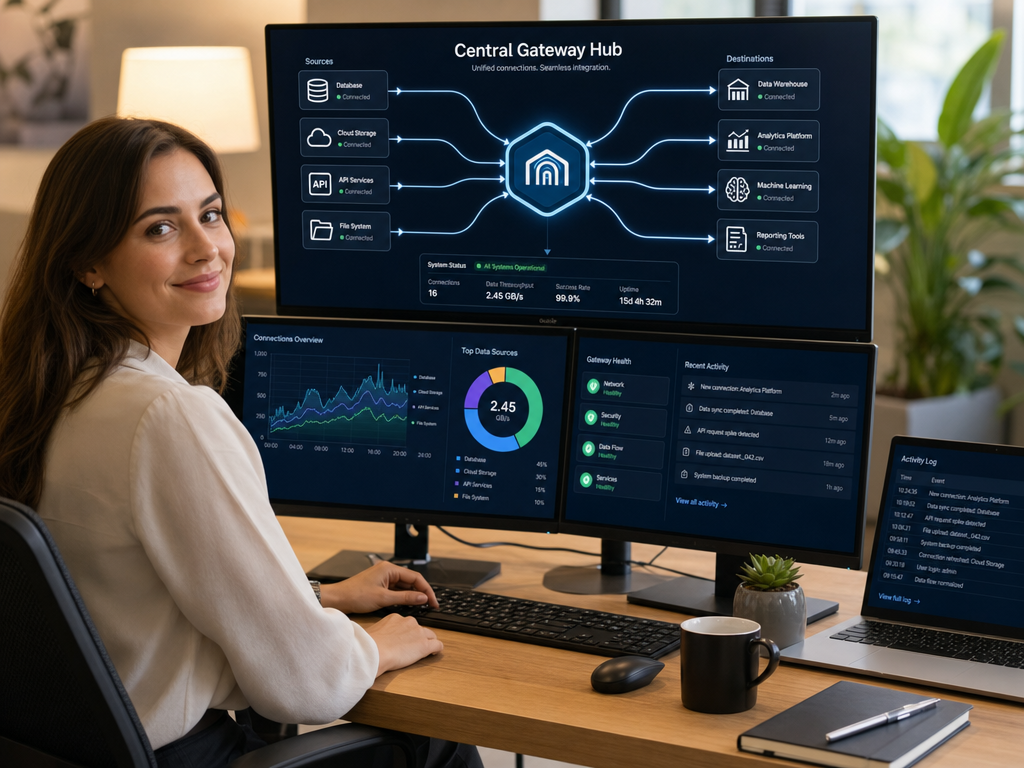
This is the problem that an MCP Gateway solves. Instead of a star topology where every client connects directly to every server, you introduce a central hub: the MCP Gateway. All clients connect to the gateway. All servers register with the gateway. The gateway handles routing, authentication, monitoring, and access control — centrally, once.
What Is an MCP Gateway?
An MCP Gateway is a middleware layer — a proxy or hub — that sits between AI clients and MCP servers. It receives tool call requests from clients, routes them to the appropriate servers, and returns the results. From the perspective of both clients and servers, the gateway is transparent: clients speak MCP to the gateway as if it were the server, and servers speak MCP to the gateway as if it were the client.
Think of it like a postal system. Instead of every person having to know the exact address and delivery route to every other person (a direct, fully-connected mesh), everyone sends mail to a central post office. The post office knows all routes and handles delivery. It also stamps, sorts, tracks, and can refuse suspicious packages — functions that would be impossible if everyone just handed letters directly to each other.
The Architecture: How All the Pieces Fit Together
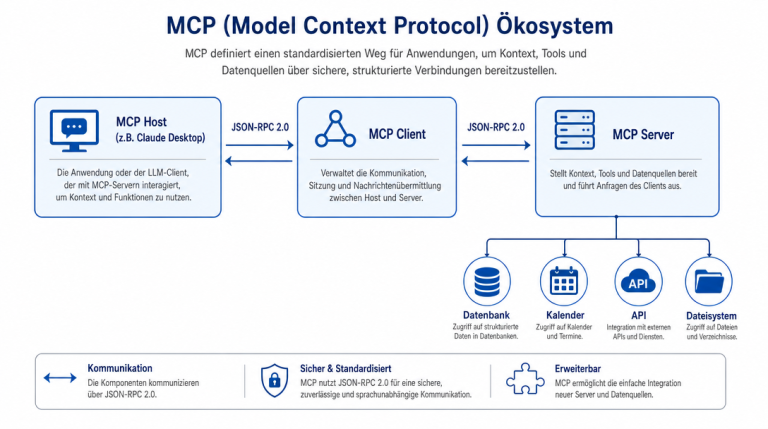
To fully understand the gateway’s role, let’s look at the complete MCP architecture stack, from top to bottom:
- AI Model / LLM: The intelligence that decides which tools to call based on the user’s request.
- MCP Client: The application (Claude Desktop, Cursor, OpenClaw) that implements the client-side MCP specification. It sends tool call requests and handles responses.
- MCP Gateway (optional but recommended): The central routing and policy layer. All client traffic flows through it.
- MCP Server: The provider that exposes tools, resources, and prompts. Examples include the official Filesystem, GitHub, Slack, and PostgreSQL servers.
- External Systems: The actual services the MCP server connects to — databases, APIs, file systems, messaging platforms.
When a user asks their AI assistant to “check the latest GitHub issues in our repo,” here’s what happens end-to-end:
- The MCP Client (e.g., Claude Desktop) receives the request from the user.
- The AI model decides it needs the GitHub server’s
list_issuestool and returns a tool call intent. - The MCP Client formats the tool call as a JSON-RPC request and sends it to the MCP Gateway.
- The gateway authenticates the request, checks RBAC permissions, logs the call, and routes it to the GitHub MCP server.
- The GitHub MCP server calls the GitHub REST API, retrieves the issues, and returns the result to the gateway.
- The gateway forwards the result back to the MCP Client.
- The MCP Client delivers the result to the AI model, which formats a human-readable response.
- The user sees the result in their AI assistant interface.
The entire exchange happens in milliseconds, and the user never interacts with the gateway directly — it’s an invisible infrastructure layer that does its job without fanfare.
Core Capabilities of an MCP Gateway
Not all gateways offer the same features, but the most important capabilities you should look for include:
1. Unified Configuration Management
Instead of managing a mcp.json file per client, you configure servers once at the gateway level. Changes propagate to all clients instantly. This alone saves hours of maintenance work in teams of any size — imagine rotating a GitHub token once instead of updating fifteen developer machines.
2. Centralized Authentication
Credentials for MCP servers (API keys, OAuth tokens, database passwords) live on the gateway, not on client machines. This means you can rotate a token once at the gateway rather than chasing fifteen laptops. It also means credentials never leave your infrastructure — critical for security-sensitive environments where compliance frameworks like SOC 2 or GDPR apply.
3. Intelligent Request Routing
Modern gateways can route requests dynamically based on the tool name, the client identity, or the request payload. A request for github.list_issues goes to the GitHub server; a request for postgres.run_query goes to the PostgreSQL server. The client doesn’t need to know which server owns which tool — the gateway figures it out and forwards the request correctly.
4. Role-Based Access Control (RBAC)
A gateway can enforce permissions at the gateway level. For example: the “marketing” chatbot can access the Slack and HubSpot servers but not the production database. The “developer” chatbot can access GitHub and the CI/CD pipeline but not Slack. This compartmentalization is nearly impossible with direct client-to-server connections, where access is essentially all-or-nothing per server.
5. Observability and Logging
Every MCP request flows through the gateway, giving you a single source of truth for monitoring. You can see which tools are called most often, which clients are generating the most traffic, which servers are slow, and which requests are failing. This is invaluable for debugging, auditing, and capacity planning — and for demonstrating compliance to auditors who need to show that sensitive data access is properly tracked.
6. Rate Limiting and Quotas
Prevent any single client (or user) from overwhelming a downstream MCP server with requests. A gateway can enforce per-client rate limits, per-server rate limits, or global budgets — protecting your infrastructure from both accidental overload and intentional abuse. Without a gateway, rate limiting must be implemented individually on each server or not at all.
7. TLS and mTLS Encryption
In production environments, all traffic between clients and the gateway (and between the gateway and servers) should be encrypted. Enterprise gateways support mutual TLS (mTLS), ensuring that both the client and the server verify each other’s certificates before exchanging data. This prevents man-in-the-middle attacks and ensures that credentials in transit are never exposed in plaintext.
MCP Gateway vs. Direct Connection — A Detailed Comparison
Let’s put the differences on the table in more detail, because the comparison matters more as your infrastructure grows:
| Aspect | Direct Connection | With MCP Gateway |
|---|---|---|
| Configuration | Per-client, per-server. Every client knows every server. Tedious to maintain at scale. | Once at the gateway. Clients only know the gateway address. |
| Authentication | Credentials distributed across all clients. Token rotation means updating every client machine. | Credentials stored on the gateway only. Rotate once, effect takes hold everywhere instantly. |
| Adding a server | Update every client’s configuration file. Easy to miss one and cause confusion. | Update the gateway. All clients can immediately access the new server without any changes on their end. |
| Monitoring | Each server logs independently, in different formats, to different places. Hard to correlate across clients. | Single pane of glass. All traffic visible, queryable, and alertable in one place. |
| Access control | All-or-nothing per server. Can’t restrict per client without writing custom middleware code. | Fine-grained RBAC: define exactly which client can access which server and which specific tools. |
| Rate limiting | Must be implemented per server individually, or not implemented at all. | Built into the gateway. Configurable per client, per server, per tool, or globally. |
| Failure isolation | A failing or misbehaving server crashes the client directly, with no graceful recovery option. | Gateway can circuit-break, retry with backoff, or gracefully degrade. Clients stay stable even when servers fail. |
| Best for | Solo developers, simple single-server setups, early-stage prototyping. | Teams, production environments, multi-server architectures. |
Real-World Use Cases for an MCP Gateway
Understanding the theory is valuable, but let’s look at where a gateway actually earns its keep in practice:
Use Case 1: Multi-Team AI Infrastructure
A company has three AI use cases running simultaneously: a customer support chatbot (needs Slack, email, and the knowledge base), a developer assistant (needs GitHub, Jira, and the CI/CD pipeline), and a data analysis bot (needs PostgreSQL, BigQuery, and the data warehouse). Without a gateway, each bot gets its own separate configuration for all required servers — a nightmare to maintain as the team grows. With a gateway, each bot connects to the gateway with its own API key, and the gateway enforces that the support bot can never touch the CI/CD pipeline or data warehouse. No code changes needed — just configuration at the gateway.
Use Case 2: Enterprise Security and Compliance
Your security team requires that all access to production systems be logged, audited, and approved before it happens. Every MCP tool call to your production database needs to be recorded with the caller’s identity, timestamp, and the exact query executed. Without a gateway, this requires instrumentation of every individual MCP server — expensive, error-prone, and easy to miss. With a gateway, it’s a configuration setting. Every call is logged transparently, and the gateway can even be configured to require approval for specific high-risk tools before executing them.
Use Case 3: Multi-Tenant SaaS
You’re a software vendor offering an AI-powered SaaS product. Your customers want to connect your AI assistant to their internal systems — their GitHub, their Jira, their Salesforce. You cannot give every customer your own credentials to these systems, and you don’t want your AI application to hold their credentials directly. A gateway lets each customer configure their own credentials on your infrastructure, and your AI only ever communicates with the gateway — never holding customer credentials directly. This separation is essential for trust in a SaaS model.
Popular MCP Gateway Solutions
The gateway market is evolving rapidly as MCP adoption grows. Here are the most notable options available today:
Biteno MCP Gateway
Biteno’s managed MCP Gateway targets enterprise teams that want a hosted, ready-to-run solution without operational overhead. It includes pre-built connectors for the most popular MCP servers (GitHub, Slack, Notion, and more), team management with RBAC, and a web-based dashboard for configuration and monitoring. If you don’t want to operate your own infrastructure — handling hosting, updates, and security patches — Biteno handles it for you. This is often the fastest path from prototype to production for teams without a dedicated DevOps person.
Cloudflare AI Gateway
Cloudflare’s AI Gateway is primarily focused on AI API management — observability, caching, rate limiting, and fallbacks for LLM API calls. It has added MCP-compatible endpoints, making it a good option if you’re already in the Cloudflare ecosystem and want basic gateway functionality alongside broader AI infrastructure management. It’s not purpose-built for MCP specifically, but it covers the basics well.
Portkey.ai
Portkey positions itself as a full AI ops platform — trace, monitor, manage, and fine-tune AI applications. Its routing layer can be extended to support MCP workflows, and its strength is deep observability into AI application behavior: latency breakdowns, token usage, error rates, and cost attribution per client and per tool. It’s a strong fit for engineering teams already doing serious AI application engineering who want production-grade observability.
n8n as a Lightweight MCP Gateway
n8n, the open-source workflow automation tool, can be used as a lightweight MCP gateway for teams with simple routing needs. You can build n8n workflows that receive MCP tool calls, inspect the payload, route them to the appropriate MCP servers, and return results. It’s not a purpose-built gateway with RBAC or audit logging, but for small teams with existing n8n infrastructure, it’s a pragmatic zero-additional-cost option that works well for basic use cases.
Custom Gateway with Node.js or Python
Because MCP is an open specification, you can build your own gateway. The official MCP SDK for JavaScript and Python includes both client and server implementations, and you can wrap them together to create a custom routing and policy layer. This gives you complete control over every aspect of the gateway behavior — but it requires meaningful engineering effort and ongoing maintenance. For most organizations, a managed solution like Biteno MCP Gateway is the better starting point. Consider a custom build only if you have very specific requirements that no managed solution covers.
Security Deep Dive
The gateway isn’t just about convenience — it’s a significant security upgrade in multiple dimensions:
Credential isolation: In a direct client-to-server setup, every client machine holds credentials for every server it needs to access. If one developer’s laptop is compromised, every connected server — and every system those servers connect to — is potentially at risk. In a gateway setup, client machines hold only the gateway’s API key or certificate — not the GitHub token, not the database password. The blast radius of a compromised laptop shrinks dramatically, because credentials never leave the gateway infrastructure.
Immutable audit trails: A well-implemented gateway logs every tool call with full context: who called it (authenticated client identity), when (timestamp), with what parameters (sanitized request body), and what the response was (including error codes). This creates a forensic record for security investigations and a compliance record for regulated industries like healthcare, finance, and legal services. With direct connections, you get audit logs only if every individual server was independently and consistently instrumented — and that’s rarely the case in practice.
Prompt injection mitigation: AI models can sometimes be manipulated through prompt injection attacks — a user prompt that tricks the model into calling a tool in an unintended way with modified parameters. A gateway can inspect tool call parameters before they’re forwarded to the server and reject suspicious payloads based on policy rules. This adds a defense layer that individual servers typically don’t implement, because the server trusts the client that called it — the gateway is the only place where you can apply untrusted input validation.
When You Should — and Shouldn’t — Use a Gateway
A gateway adds real complexity. It’s not free — there’s operational overhead to running and maintaining it. Here’s a practical decision framework to help you decide:
- Use a gateway if: You have more than two MCP servers; you’re working in a team of more than two people; you have compliance or regulatory requirements; you’re deploying MCP in a production environment; you need per-client or per-user access control; you want centralized monitoring.
- Skip the gateway if: You’re a solo developer prototyping with one or two servers; you’re learning MCP for the first time and want to understand how clients and servers connect directly; your use case is purely experimental with no security sensitivity and no team sharing.
Think of it like HTTPS for your web application: you don’t always need it for a local development setup, but the moment you go to production or handle any sensitive data, it becomes non-negotiable. The same logic applies to MCP Gateways. Start simple, add a gateway when the complexity becomes worthwhile — not before.
Getting Started with an MCP Gateway
If you’re ready to add a gateway to your MCP stack, here’s a practical step-by-step sequence:
- Step 1 — Validate your servers: Make sure you have at least two MCP servers running and working correctly. If you only have one server and one client, a gateway adds more complexity than it removes at this stage. Get the basics working first.
- Step 2 — Choose your gateway solution: For most teams, a managed solution like Biteno MCP Gateway is the fastest path to value. Evaluate the managed options first before investing engineering time in a custom build.
- Step 3 — Register your servers: Most gateways provide a web UI or CLI for registering existing MCP servers. This is typically a matter of providing the server’s connection endpoint and any required credentials.
- Step 4 — Update client configurations: Point your MCP clients to the gateway instead of individual servers. Most clients support a gateway URL in their
mcp.jsonconfiguration. - Step 5 — Test the full flow: Make a request through the client, verify it reaches the gateway, check the logs, confirm the server response comes back correctly. Test the failure path too — what happens when a server is down?
- Step 6 — Configure policies: Set up RBAC rules, rate limits, and any security policies specific to your environment. Start permissive, then tighten as you validate the setup.
Conclusion
An MCP Gateway is the architectural layer that turns a chaotic collection of individual MCP server connections into a managed, secure, observable, and scalable AI infrastructure. Whether you’re a solo developer with three servers or an enterprise team with thirty, the gateway pattern transforms MCP from a powerful but fragmented toolkit into a production-ready AI integration layer.
If you understand servers and clients, the gateway completes the picture. In our next article, we explore popular MCP clients and configuration patterns — the AI applications that consume MCP servers — including a detailed comparison of the most popular clients and practical guidance on choosing and configuring the right one for your workflow.

Hi, I’m Mark, the author of Clever IT Solutions: Mastering Technology for Success. I am passionate about empowering individuals to navigate the ever-changing world of information technology. With years of experience in the industry, I have honed my skills and knowledge to share with you. At Clever IT Solutions, we are dedicated to teaching you how to tackle any IT challenge, helping you stay ahead in today’s digital world. From troubleshooting common issues to mastering complex technologies, I am here to guide you every step of the way. Join me on this journey as we unlock the secrets to IT success.