AI assistants like Claude or ChatGPT are powerful — but without connections to external systems, they remain trapped in an information bubble. They can reason brilliantly about data you paste into them, but they cannot look up your calendar, query your database, or trigger actions in your business tools. That is exactly the gap that the Model Context Protocol (MCP) was built to close. MCP is the missing layer that transforms a smart chatbot into a genuine AI work partner. In this guide, we explain what MCP servers are, how the technology works under the hood, and what concrete use cases are already possible today.
What Is the Model Context Protocol (MCP)?
The Model Context Protocol — MCP for short — is an open standard for connecting AI applications to external systems, data sources, and tools. It was developed by Anthropic and released as an open-source project in November 2024. Since then, it has rapidly grown into the de-facto standard for AI agent integrations, with adoption from OpenAI, Microsoft, Google DeepMind, and hundreds of independent developers.
The simplest analogy: MCP is like a USB-C port for AI applications. Just as USB-C provides a universal physical interface for electronic devices — so you do not need a different cable for every gadget — MCP provides a standardised software interface for connecting AI models to data sources and tools, regardless of which AI model or host application is in use.
Before MCP existed, every AI integration was a one-off project. Connecting a chatbot to a database required writing a custom plugin. Linking it to a calendar required another. Connecting it to a CRM system required yet another, often incompatible approach. With MCP, you build the server once and it works with every MCP-compatible AI application from that point forward. That is a fundamental shift — from bespoke integrations to a reusable, composable infrastructure layer.
The Three-Component Architecture
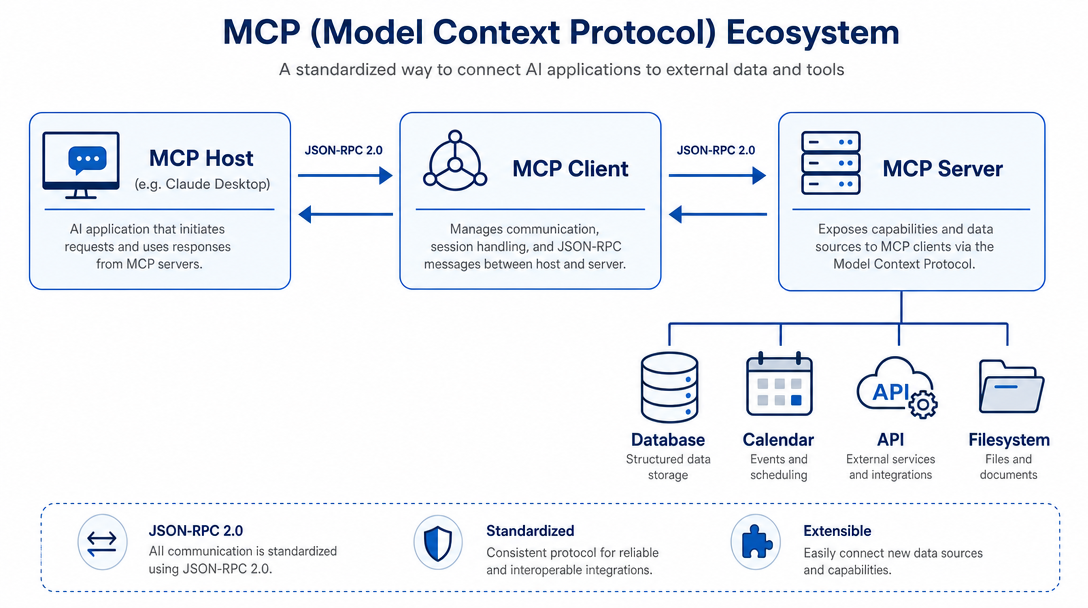
The MCP ecosystem is built around three core components that work together seamlessly:
- MCP Host: The AI application that orchestrates everything — for example Claude Desktop, Visual Studio Code with Copilot, or a custom-built AI agent platform. The host manages one or more client connections and decides when to call which server.
- MCP Client: A component embedded within the host that establishes and maintains the connection to a specific MCP server (see our detailed guide on how an MCP Client connects to servers). Each client holds exactly one server connection, keeping the architecture clean and predictable.
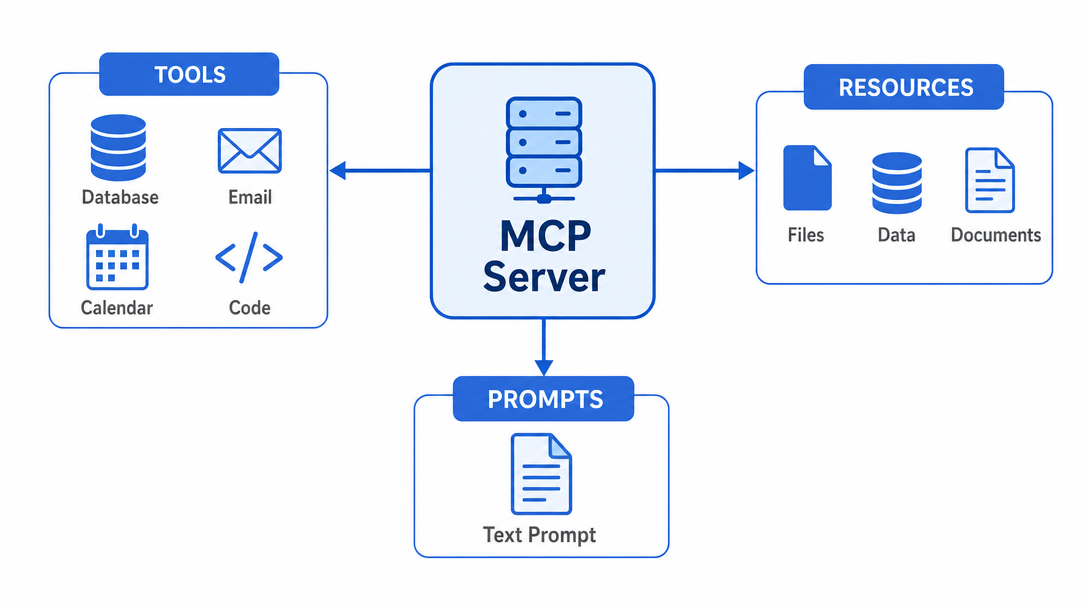
- MCP Server: A lightweight program that exposes capabilities — tools, resources, and prompts — to the AI model. Servers can run locally on the user’s machine or remotely as a cloud service.
Communication between client and server uses JSON-RPC 2.0, a lightweight, battle-tested protocol for structured data exchange. Every connection starts with a capability handshake: client and server exchange what they support before any real work begins, similar to two colleagues introducing themselves and clarifying their roles before starting a project.
Transport Mechanisms: Local vs. Remote
MCP supports two transport mechanisms, each suited to different deployment scenarios:
- Stdio Transport: Used for local servers running on the same machine as the host. Communication happens via standard input/output streams. This offers maximum performance with zero network overhead and is ideal for filesystem access, local databases, and sensitive enterprise data that must never leave the device.
- Streamable HTTP Transport: Used for remote servers accessible over the internet. This supports OAuth 2.0 authentication, Server-Sent Events (SSE) for real-time updates, and scales to multiple users and devices. Ideal for SaaS integrations, company-wide deployments, and cloud infrastructure.
Choosing the right transport is a security and architecture decision. For anything involving sensitive data, stdio and local deployment is the safer choice. For scalable enterprise deployments, HTTP transport with proper authentication is the standard approach.
The Three Core Primitives: Tools, Resources, and Prompts
What an MCP server can offer to the AI model is organised into three types of capabilities — called primitives:
1. Tools — Execute Actions in the Real World
Tools are executable functions the AI can invoke to trigger real-world actions. They are the “hands” of the AI model. Common examples include:
- Running database queries and returning structured results
- Sending emails or Slack messages on behalf of the user
- Creating, updating, or deleting calendar entries
- Reading from and writing to the local filesystem
- Executing code in a sandboxed environment
- Making API calls to third-party services
- Triggering workflows in automation platforms like n8n or Zapier
The MCP client discovers available tools automatically via the tools/list method during the initial handshake. The AI model knows exactly what actions are available and selects the appropriate tool when the task requires it — no manual wiring needed.
2. Resources — Provide Context and Knowledge
Resources are data sources that supply the AI with contextual information it needs to reason accurately. Unlike tools (which do things), resources provide information. Examples include:
- File contents from the local filesystem
- Database records and query results
- API responses from web services
- Internal documentation and knowledge bases
- Real-time data feeds from monitoring systems
- Product catalogues, pricing tables, or customer profiles
A practical example: an MCP server for a CRM system can deliver the complete interaction history for a given customer as a resource. The AI then answers questions about that customer based on real, current data — not on what it learned during training. This closes the gap between static AI knowledge and dynamic business reality.
3. Prompts — Structure and Standardise AI Interactions
Prompts are reusable templates that guide how the AI model handles specific tasks or data formats. They can include:
- Few-shot examples for recurring task types
- Output formatting instructions (e.g., always return JSON with specific fields)
- Role definitions that adapt the AI’s behaviour for a particular context
- Company-specific phrasing guidelines or terminology rules
For enterprises, prompts are particularly valuable because they can be centrally managed on the MCP server and distributed automatically to all connected AI applications. Instead of every team member maintaining their own prompt library, a single authoritative source governs how the AI behaves across the organisation.
Real-World Use Cases: What You Can Actually Build
The theory is compelling — but what does MCP look like in production? Here are the most impactful use cases being deployed today:
Personal AI Assistant with Real Context
Connect an MCP server to Google Calendar, Notion, and your email client, and an AI assistant becomes a genuine personal assistant. It can check your schedule before suggesting meeting times, review your open tasks before recommending priorities, and draft emails that reference real context — without you having to paste anything manually. The AI works with your actual data, not hypothetical examples.
AI-Augmented Software Development
Developer tools like Cursor and Visual Studio Code with GitHub Copilot use MCP to connect AI assistants to the local filesystem, databases, and external APIs. Claude Code, for example, can generate a complete web application from a Figma design — because an MCP server delivers the Figma component data in real time. Developers are reporting 40–60% productivity gains on repetitive coding tasks when MCP-connected AI is part of their workflow.
Enterprise Chatbots with Live Database Access
Companies are deploying internal chatbots that connect to multiple enterprise databases via MCP. Employees ask questions in plain language — “What were our top five customers by revenue last quarter?” — and the chatbot executes the necessary queries, aggregates the results, and delivers a direct answer. This is dramatically more capable than traditional FAQ systems and more cost-effective than building custom BI tools for every use case.
Autonomous Multi-Step AI Agents
MCP enables AI agent platforms that can autonomously complete multi-step business workflows. A single agent could:
- Read an incoming support email (MCP server: Email)
- Look up the customer’s account in the CRM (MCP server: CRM)
- Check the relevant order status (MCP server: ERP)
- Draft a personalised response and flag it for human approval
- Send the approved reply and log the interaction (MCP server: Email + CRM)
No custom code changes. No new integrations. Every step runs through standardised MCP interfaces, and new data sources can be added without rebuilding the agent.
IT Operations and Monitoring
MCP servers can bridge AI assistants with infrastructure monitoring tools, log aggregation systems, and incident management platforms. An on-call engineer can ask their AI assistant: “What changed in the last hour before this alert fired?” and get a synthesised answer drawn from logs, deployment records, and configuration diffs — all pulled in real time via MCP.
Hardware and Physical Systems
MCP is not limited to software. There are already MCP servers connecting AI models to Blender for 3D design generation, to 3D printers for direct fabrication instructions, and to IoT sensor networks. The standardised protocol works wherever a server can be implemented — which is essentially anywhere.
Who Supports MCP?
The MCP ecosystem has grown remarkably quickly since the November 2024 launch. Key adopters include:
- AI Assistants: Claude (Anthropic), ChatGPT (OpenAI), Gemini (Google)
- Developer Tools: Visual Studio Code, Cursor, JetBrains IDEs, Windsurf
- Enterprise Platforms: GitHub, Atlassian (Jira/Confluence), Sentry, Cloudflare
- Database Tools: Supabase, PlanetScale, MongoDB Atlas
- Cloud Providers: AWS, Azure, and Google Cloud all offer MCP server implementations for their services
The official MCP documentation lists hundreds of community-built servers covering almost every service imaginable — from Slack and Linear to PostgreSQL and Kubernetes. The GitHub repository has accumulated over 40,000 stars, signalling strong developer adoption.
Local vs. Remote MCP Servers: Which Is Right for You?
When planning an MCP integration, the local vs. remote decision is among the most important architectural choices. Here is a practical comparison:
| Aspect | Local MCP Server | Remote MCP Server |
|---|---|---|
| Data location | Stays on the device — never leaves the machine | Travels over the network to a central server |
| Setup effort | Must be installed and maintained on each device | Deployed once, available to all users and devices |
| Performance | Fastest — no network latency | Depends on network quality and server load |
| Scalability | Limited to the local machine | Horizontally scalable in the cloud |
| Authentication | Typically none needed (same-machine trust) | OAuth 2.0, API keys, or mutual TLS required |
| Best for | Filesystem access, local DBs, sensitive data | SaaS integrations, team deployments, cloud workloads |
MCP Security: What Enterprises Need to Know
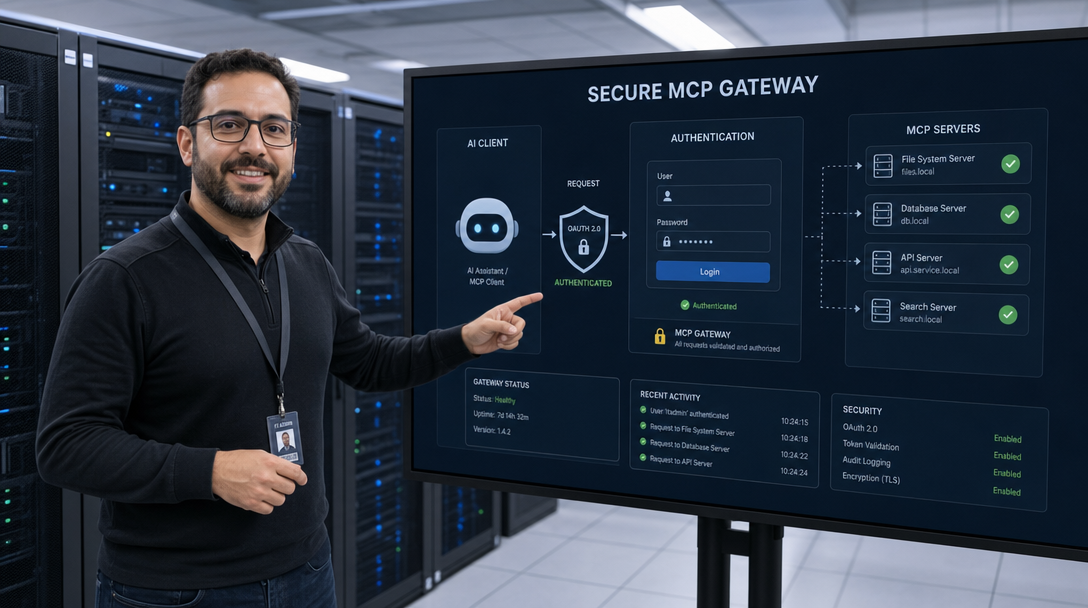
Increased connectivity means an increased attack surface. MCP is security-conscious by design, but — as with any interface — the implementation matters as much as the protocol itself (learn how a centralized MCP Gateway resolves server sprawl and security risks). Key considerations for enterprise deployments:
- Authentication: Remote MCP servers should always be protected with OAuth 2.0 or robust API key management. Never expose an MCP server to the public internet without authentication.
- Principle of least privilege: Each MCP server should receive only the permissions it actually needs.
- Audit logging: Which AI application called which tool, at what time, and with what parameters? Full audit trails are essential for compliance and incident investigation.
- Data residency: If the MCP server transmits personal data, GDPR and local data protection regulations apply — even when the processing is performed by an AI model.
- Input validation: MCP servers should sanitise all inputs from the AI model before passing them to downstream systems.
- Rate limiting: Prevent runaway AI agents from hammering your databases or external APIs by implementing rate limits at the MCP server layer.
How to Get Started with MCP Servers
- Use existing servers: The official reference implementations on GitHub provide production-ready servers for Filesystem, PostgreSQL, Slack, GitHub, Google Drive, and many more.
- Build custom servers with SDKs: MCP SDKs are available for Python, TypeScript, Java, Kotlin, and C#. A first functional MCP server can be built in a few hours.
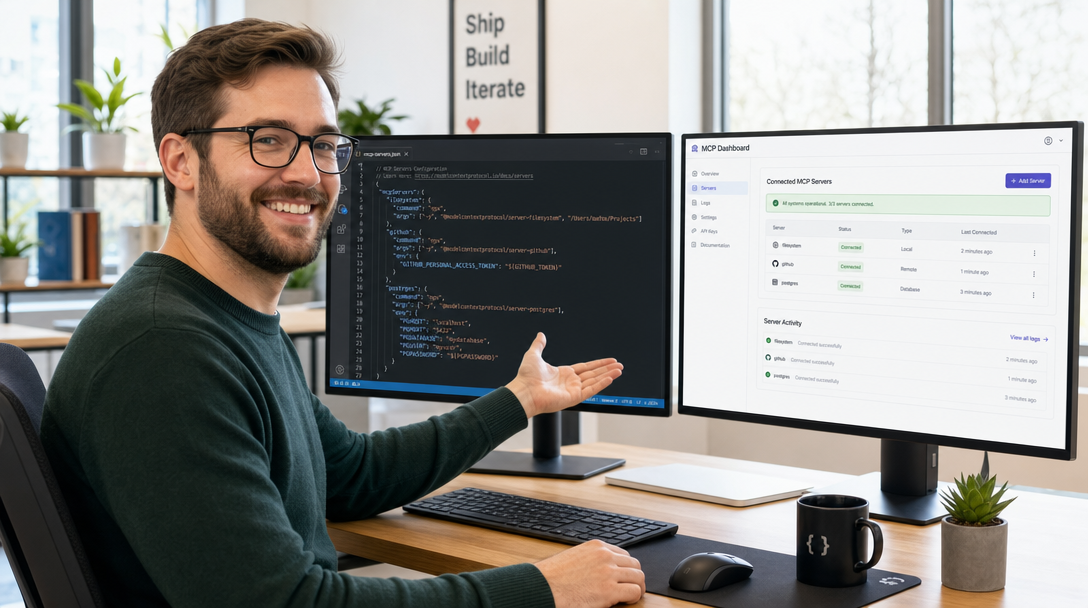
- Configure your AI application: Claude Desktop, Cursor, VS Code, and most other MCP-compatible hosts simply need the server path or URL added to their configuration file.
- Test incrementally: Start with a single server exposing one or two tools. Use the MCP Inspector tool to debug server responses interactively.
MCP vs. Traditional API Integrations
- Self-describing: MCP servers advertise their capabilities at runtime — no hardcoded API knowledge required.
- AI-native: Designed for LLM interaction patterns including streaming, multi-turn conversations, and dynamic tool selection.
- Composable: Multiple MCP servers can be used in a single reasoning step.
- Standardised: Any MCP server works with any MCP-compatible AI client — no vendor lock-in.
The Future of MCP
MCP is evolving rapidly. The roadmap includes richer authentication flows, standardised observability, multi-agent coordination, and versioning guarantees for enterprise deployments. The direction is clear: MCP is becoming the full AI integration platform for the enterprise era.
Conclusion: MCP Is the Infrastructure Layer of the AI Era
The Model Context Protocol is not another AI hype cycle. It is infrastructure — as foundational to the AI era as REST APIs were to the web era. Every MCP server you build today works with every future AI model that adopts the standard. The question is no longer whether MCP will become the standard. It already is.
Further Reading
- Official MCP Documentation (modelcontextprotocol.io)
- MCP on GitHub — Specification, SDKs, and Reference Servers
- Anthropic: Model Context Protocol Announcement
Ready to Integrate MCP Into Your Business?
Whether you are evaluating MCP for the first time or planning a full enterprise deployment, we can help you design the right architecture, select the best servers for your use case, and implement a secure, scalable MCP integration. Get in touch — we typically respond within 24 hours.

Hi, I’m Mark, the author of Clever IT Solutions: Mastering Technology for Success. I am passionate about empowering individuals to navigate the ever-changing world of information technology. With years of experience in the industry, I have honed my skills and knowledge to share with you. At Clever IT Solutions, we are dedicated to teaching you how to tackle any IT challenge, helping you stay ahead in today’s digital world. From troubleshooting common issues to mastering complex technologies, I am here to guide you every step of the way. Join me on this journey as we unlock the secrets to IT success.